LiveFree
Date of Birth, set up for you
By default, Date of Birth starts with Calculate age on, the six default age bands, and a window of 120 years ending on the day you add the question.
Every setting it starts with is yours to change.
Date question · Text
Ask for a date of birth and get each respondent’s age, worked out when they answer, with age bands in Results and the age in its own export column. Or ask for any other date, inside the earliest and latest dates you set.
Live demo
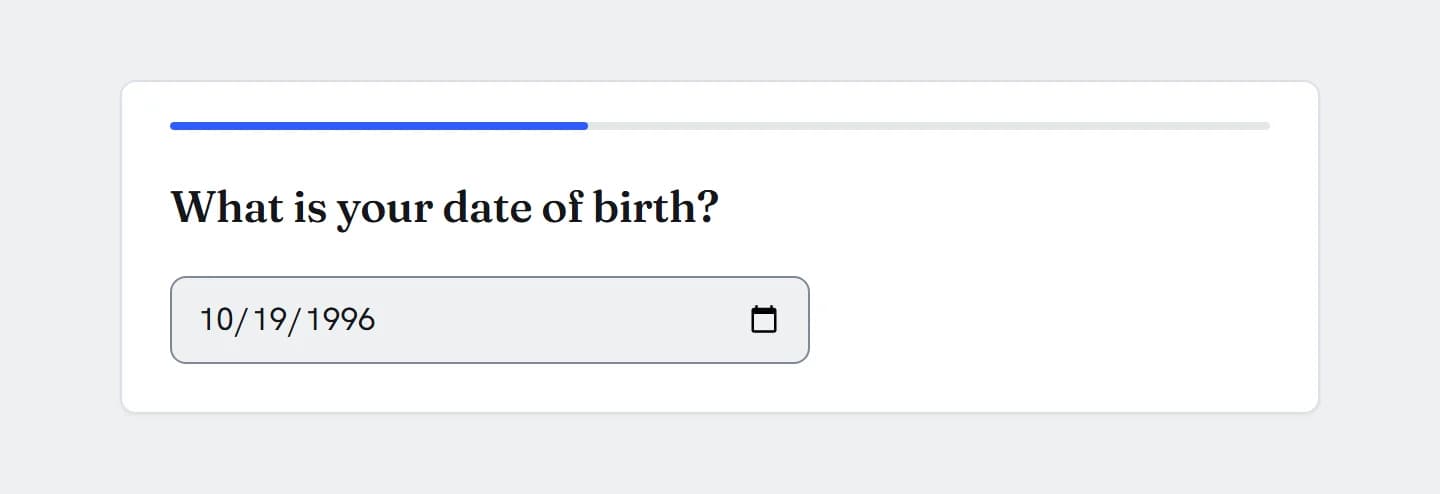
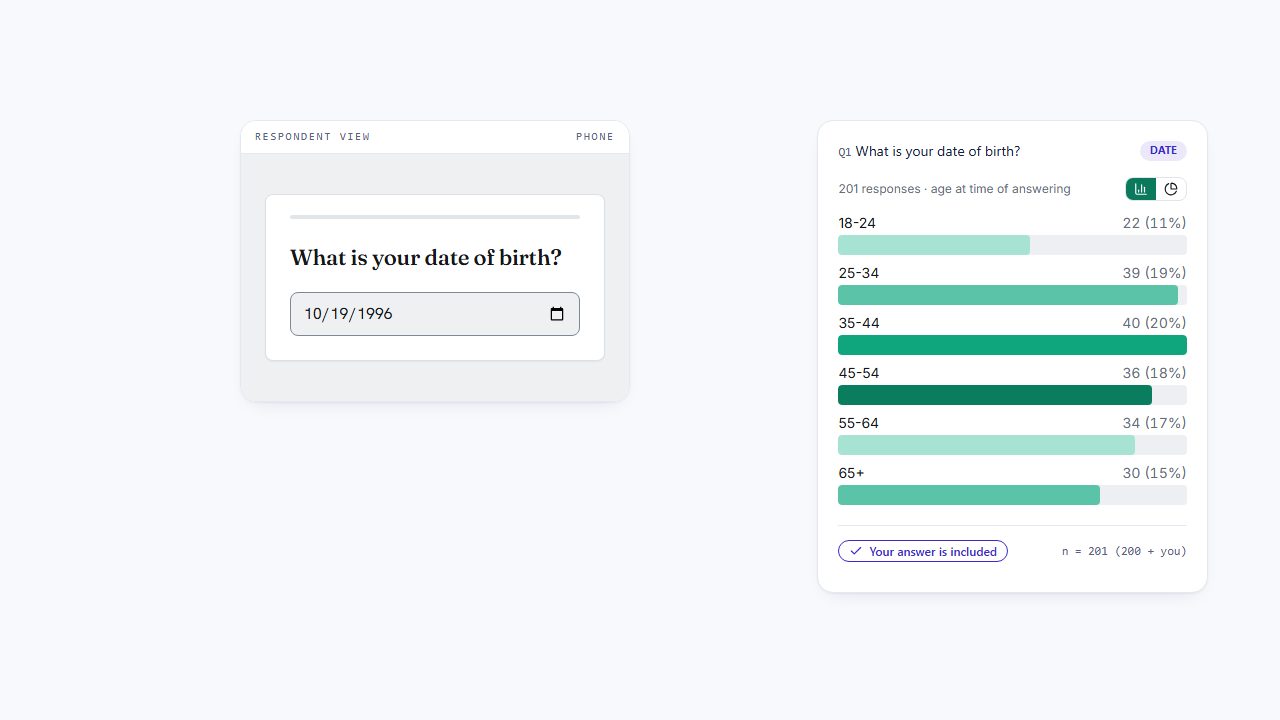
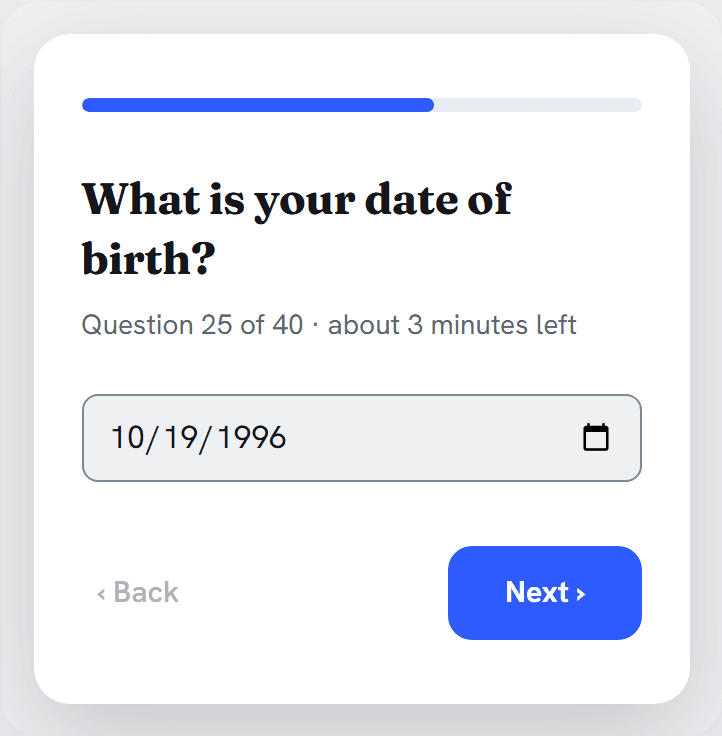
This is the question your respondents get. Type or pick a date, press Next, and watch the results beside it count you, and the row your answer becomes in the export.
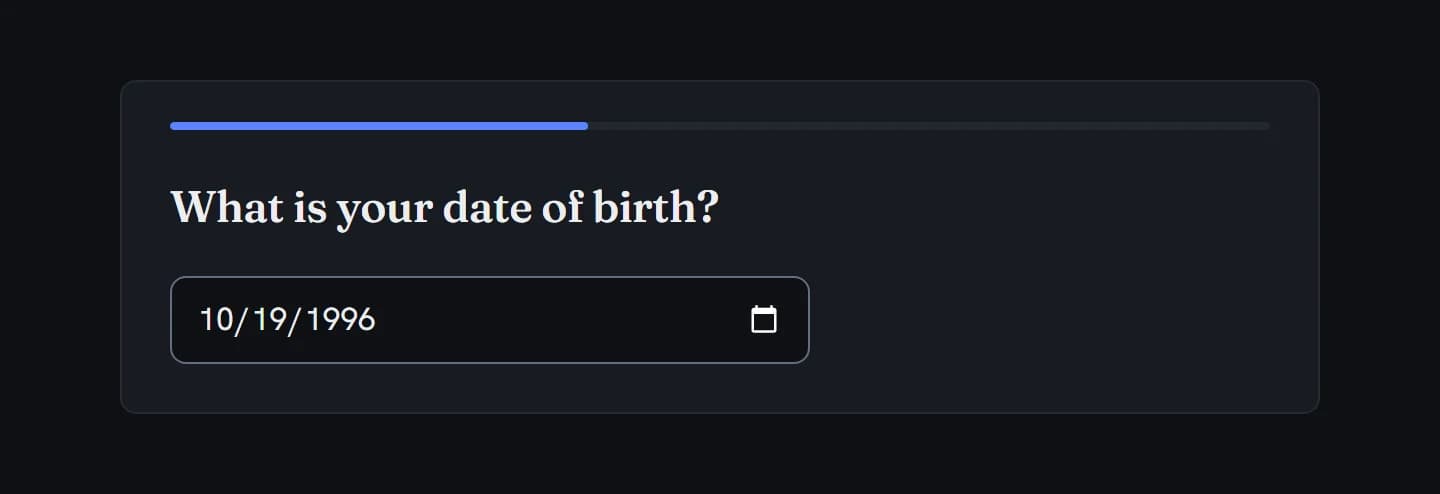
What is your date of birth?
In action
Every feature
A date of birth with the age worked out, any other date inside the window you set, and age bands, age rules and an age column.
By default, Date of Birth starts with Calculate age on, the six default age bands, and a window of 120 years ending on the day you add the question.
Every setting it starts with is yours to change.
Set an Earliest Date and a Latest Date. Next checks the date, and the server checks it again.
A date outside the window gets the standard “Please answer this question to continue.” message, so say the range in your question.
With Calculate age on, the server works out each person’s age in whole years when they answer, saves it with the answer, and exports it as Q1_AGE.
It’s their age on the day they answered by the UTC date, and it doesn’t change later.
18-24, 25-34, 35-44, 45-54, 55-64, 65+ by default. Edit a band’s label and ages, add a band, or reset to the defaults.
Keep the bands in order with no gaps or overlaps: the editor flags a list that isn’t.
Turn on Non-answer options for Don’t know and Prefer not to answer, or write your own. Choosing one clears the date, and an opt-out gets no age.
Required by default: Next needs a date, or an opt-out if you offer them. A soft-required question warns once before a skip. An optional one can be left blank.
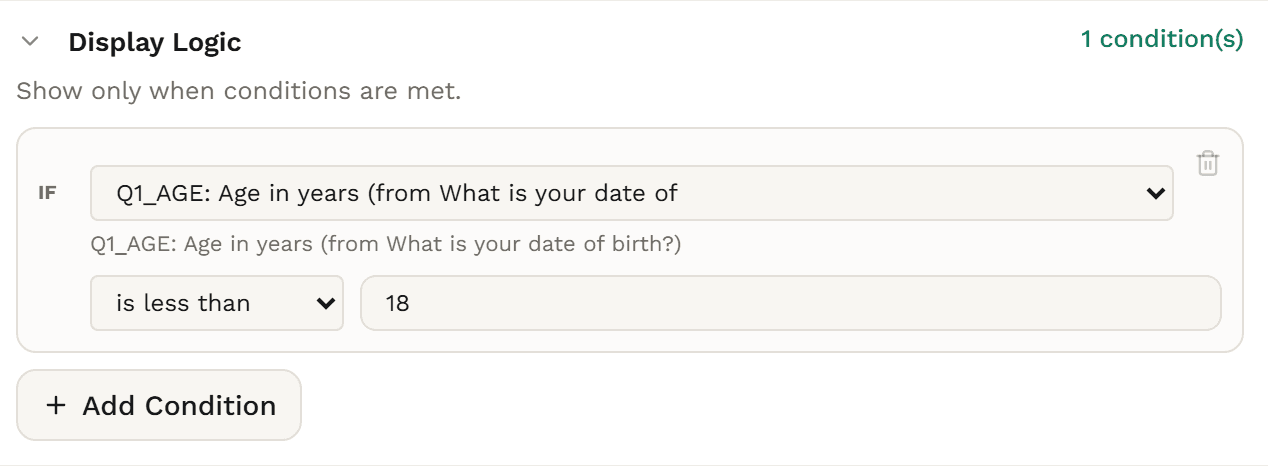
Each Date of Birth question adds its age in whole years to your logic, under a name such as Q1_AGE. Show, skip or end the survey on a rule such as under 18, or between 18 and 34.
Rules on the age need Calculate age on.
Quotas can use the age too, such as 18 to 34, or 55 and over.
Show a follow-up to people who gave a date, or who gave one exact date, and skip it for everyone else.
Show a follow-up to people who gave a date before, after or between the dates you set, such as a visit after 13 July 2026.
The question, its help text and the opt-out labels translate with your survey.
The date field follows the respondent’s browser language, not the survey’s, and age band labels aren’t translated.
People type the date, or use the date picker their browser already has, on a laptop or a phone.
The order of day, month and year follows the browser’s language.
While an opt-out is chosen, the date field is cleared, dimmed and can’t be used. Choose the opt-out again to clear it.
Tab to the date field and type the date. Tab to an opt-out and press Space to choose it.
The date field follows the survey’s theme and dark mode.
A Date of Birth question charts a bar for each age band, in band order, empty bands included, by the age people were when they answered.
Ages outside every band get an Other ages bar. Opt-outs count in the total without a bar.
Results never lists a Date of Birth question’s exact dates. With Calculate age off, it groups them by birth decade.
A Date question charts how many people gave each date, with the most-given date at the top.
Dates aren’t grouped by week, month or year, so keep the window short.
Use the age bands as a row or a banner in crosstabs (Solo+), with significance letters on Professional+.
Ages outside your bands are left out of crosstabs (Solo+). A band list the editor flags gets no bands there, and Results falls back to the default bands.
A Date of Birth question with age bands gets its own table in your tab book (Research Team).
Plain dates aren’t tabulated, and a band list the editor flags gets no table.
Filter Results to a group, and the age bands recount for it.
A date question can’t be a filter itself.
Q1 holds the date in year-month-day form, such as 1996-10-19, labelled with your question.
In Excel the date is text, so convert it before using date filters or date sums.
Q1_AGE holds each person’s age in whole years, labelled with your question and “(age)”.
For an average age, use it in your CSV export, or in SPSS (Professional+).
Exports leave the birth date column out until you tick Include personal data. With Calculate age on, the age column is always there.
A date, or a birth date once you include personal data, exports as an SPSS date variable (Professional+), and Q1_AGE as a scale variable.
With an opt-out code in the column, the date exports as text.
Not part of date questions yet: a choice of date format, separate day, month and year boxes, answers with just a month and year or just a year, times, limits relative to today such as “no future dates”, a minimum-age setting, an average age in Results, piping the date into later questions, and dates on dashboards or in report decks.
Choosing
A birth date gives you each person’s exact age. A number gives you an age people type. A list of age bands gives you a group people pick. Each suits a different survey.
Need a date that isn’t a birthday, such as the day someone visited? Use a Date question, and set the earliest and latest day it can be.
Build it
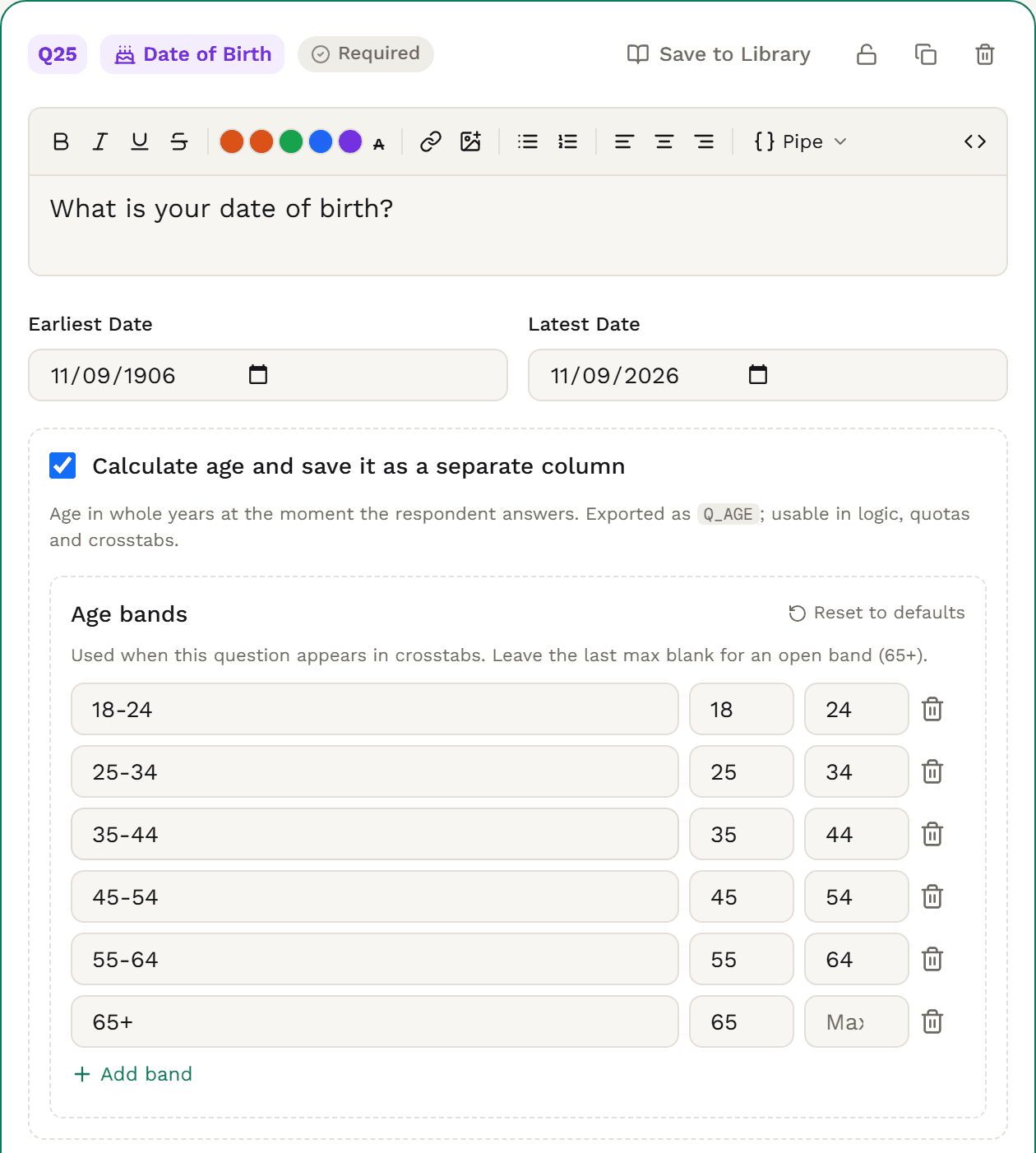
In the builder, choose Date of Birth (“Birthdate with an automatically calculated age”) from the Text group for a birth date, or Date (“Pick a date”) for any other date. Write the question, such as “What is your date of birth?”
Set Earliest Date and Latest Date. By default, Date of Birth runs from 120 years before the day you add it to that day. For an event, use the days it opened and closed.
Keep Calculate age and save it as a separate column ticked for the age column, age rules and age bands. Edit the Age bands, or choose Reset to defaults. Settle these before the survey goes live.
Tick Non-answer options for Don’t know and Prefer not to answer, or write your own.
In show, skip and quota rules, pick its age, such as Q1_AGE (“Age in years”), as the source, then is less than 18 to screen people out.
A date question is required by default. Soft required warns once before a skip; optional can be left blank. Preview on a phone and a laptop before you launch.
The data you get
A date of birth question gives two columns: the birth date as entered, and the age in whole years. The birth date column stays out of exports until you tick Include personal data.
| respondent_id | Q1_AGE |
|---|---|
| 47762a85-0001-4000-8000-000000000001 | 30 |
| 47762a85-0002-4000-8000-000000000002 | 72 |
| 47762a85-0003-4000-8000-000000000003 | 54 |
| 47762a85-0004-4000-8000-000000000004 | 34 |
| 47762a85-0005-4000-8000-000000000005 | 47 |
| 47762a85-0006-4000-8000-000000000006 | 29 |
| 47762a85-0007-4000-8000-000000000007 | 20 |
| 47762a85-0008-4000-8000-000000000008 | 19 |
Trimmed to the question’s columns. With Include personal data unticked, the birth date column is left out and the age stays. Every export also carries the respondent columns (status, language, timing and more).
Q1 holds the date in year-month-day form, such as 1996-10-19, labelled with your question. In Excel the date is text, so convert it before using date filters or date sums.
Q1_AGE is labelled with your question and “(age)”, and comes with every export. For an average age, use it in your CSV export, or in SPSS (Professional+).
The birth date column is left out until you tick Include personal data. A Date question’s column, such as Q1 for the festival day, is always included.
An opt-out writes its code, such as PNTA, in the date column and leaves the age blank. In SPSS (Professional+), a date column with an opt-out code in it exports as text.
Charts & analysis
Results charts a date of birth question by age band, or by birth decade with Calculate age off, and crosstabs use the bands as a row or a banner (Solo+). A date question gets a bar for each date people gave.
What is your date of birth?Results · date of birth · 200 answers
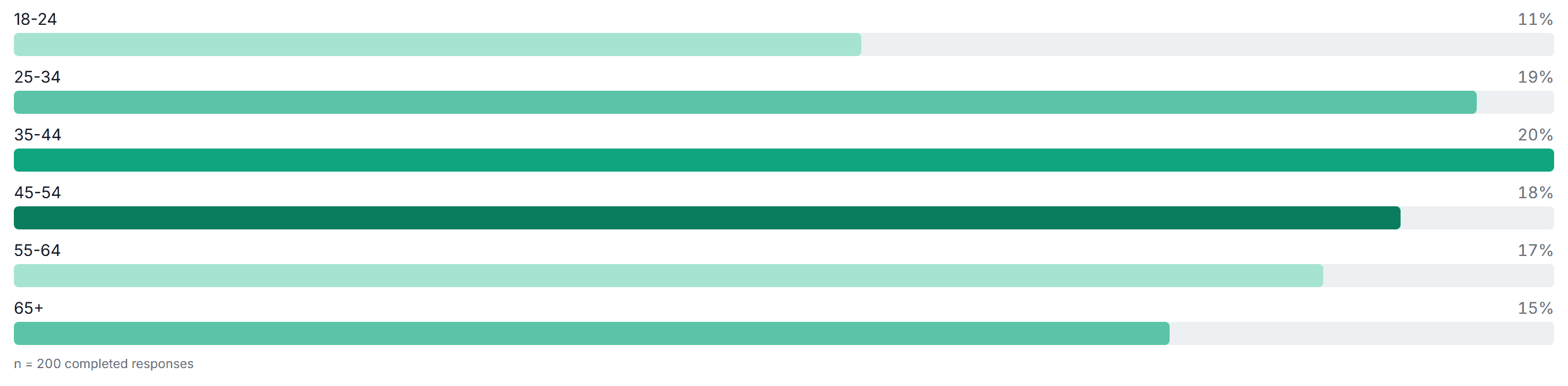
Use the age bands as a row or a banner, and see how each band answered everything else. Ages outside your bands are left out of crosstabs (Solo+). A band list the editor flags gets no bands there, and Results falls back to the default bands.
On Professional+, column letters mark where an age band differs significantly from another, as they do for any banner.
A date of birth question with age bands gets its own table in your tab book (Research Team). Plain dates aren’t tabulated, and a band list the editor flags gets no table.
Filter Results to a group, such as people who answered a screener a certain way, and the age bands recount for that group. A date question can’t be a filter itself.
How Surveti compares
| Capability | Surveti | SurveyMonkey | Qualtrics | Typeform | Alchemer |
|---|---|---|---|---|---|
| A date question type | yesDate, and the Date of Birth preset | yes1Date / Time | yes3, 4Calendar (a permission); Text Entry with date validation | yes8 | yes11 |
| A calendar picker | yesThe browser’s own | unclear1Text boxes; no picker described | yes3Calendar | unclear8, 9 | yes11 |
| Author chooses the date format | noFollows the browser | yes1Two formats | partial3, 4Base language (Calendar); a format list (Text Entry) | yes8Three orders and a separator | yes11Three formats |
| Dates without a day or a year | no | partial1Date/Month, Month/Year (search summary) | unclear3 | unclear8 | unclear11 |
| Time as well as date | no | yes1 | yes3 | unclear8 | unclear11 |
| Earliest and latest date | yesChecked on the server too | partial1Single Textbox workaround; years from 1900 | yes3Restrict ranges (Calendar) | no8No date bounds in the API | yes11 |
| Limits relative to today | noFixed dates | unclear1 | unclear3 | unclear8 | yes11“today”, “-1 week” |
| Minimum-age check on a birth date | partialA rule on the age, such as under 18 | unclear1 | partial6Custom JavaScript (community) | unclear | partial12Age script, then logic |
| Age worked out from the birth date | yesWhole years, when they answer | unclear1 | partial6Custom JavaScript (community) | unclear | partial12JavaScript action; not on mobile |
| Age groups in reporting | yesResults; crosstabs on Solo+ | unclear | unclear | unclear | unclear |
| A chart of date answers | partialA bar per exact date | no1“Charts are not generated” | partial3Date field in Results and Reports | unclear | partial11A collapsed response list |
| Export layout documented | yesDates and the age; birth dates on request | unclear1 | unclear3 | unclear | yes11One column |
| Logic on a date | yesBefore, after, between, or an exact date | unclear1 | unclear3 | unclear10Community threads ask | unclear11 |
| Required | yesOr soft required | yes1 | yes3Force or request | yes8 | unclear11 |
| Format follows the survey language | noFollows the browser | unclear1 | yes3Base language (Calendar) | unclear | unclear11 |
| On the free or entry plan | yesFree | unclear1 | partial3Calendar needs a user permission | unclear | unclear11 |
Partial means partly built in, or possible through a documented workaround; unclear means the vendor’s public docs don’t settle it. Also documented elsewhere: QuestionPro’s month-and-year and year formats, SurveySparrow’s dates relative to the day someone answers, Jotform’s Age Verification on its Date Picker, and Google Forms’ optional year and time.
Date questions, Date of Birth included, with age rules, quotas, Results, and CSV and Excel exports, are on Free.
With Calculate age on, the server works out each person’s age in whole years when they answer, and keeps it in its own column.
Results charts a date of birth question by age band, or by birth decade with Calculate age off, so no one’s birth date is listed in a chart.
Use the age in show, skip and end rules, and in quotas.
The birth date column stays out of exports until Include personal data is ticked. With Calculate age on, the age column is always there.
Dates export to SPSS (Professional+) as date variables when the column holds nothing but dates, birth dates once you include personal data, and the age as a scale variable.
When to use it
“What is your date of birth?” · “Which day did you visit the food festival?”, Earliest Date 13 July 2026, Latest Date 19 July 2026
Accessibility
People type the date or use their browser’s date picker, the same field that browser shows on other sites.
Tab to the date field and type the date. Tab to an opt-out and press Space to choose it.
Each opt-out is a button that reports whether it’s pressed. While one is chosen, the date field is taken out of use, for the keyboard too.
A chosen opt-out gets a thicker border and bolder text, and the field and every opt-out show a focus ring.
Use it in
Solution
Screeners that route and fill quotas by age, with age bands as a crosstab banner (Solo+).
Solution
Each participant’s age in its own column, and the birth date as an SPSS date variable (Professional+) when you include personal data and the column holds nothing but dates.
Solution
The date of a visit, a stay or a delivery, inside the dates you set.
Example
“What is your date of birth?” for 200 adults, charted across six age bands from 18-24 to 65+.
A question that asks for a birth date and works out each respondent’s age from it. In the builder it’s Date of Birth (“Birthdate with an automatically calculated age”): a date question with Calculate age on, so one answer gives you the date, the age and an age band.
Ask for a date of birth when you need exact ages: to screen out under-18s, set quotas by age, or export each person’s age. Ask age as a number, with an open-ended question in Number format, for an average in Results. Offer age bands in a single choice or dropdown when a group is enough and people may not want to share a birth date.
When someone answers, the server works out their age in whole years from the birth date and saves it with the answer, so it doesn’t change later. It’s their age on the day they answered by the UTC date, so someone answering on or the day before their birthday can be counted a year off, depending on their time zone.
Yes, with a rule on the age: for example, end the survey when Q1_AGE is less than 18. There’s no minimum-age setting, and by default the window accepts any birth date in the last 120 years, under-18s included.
Not yet. Results shows the age bands. For an average age, use the Q1_AGE column in your CSV export, or in SPSS (Professional+).
Results never lists them: it shows age bands, or birth decades with Calculate age off. Exports leave the birth date column out until you tick Include personal data, and with Calculate age on, the age column is always there.
Their browser’s own date field: they can type the date or use the browser’s date picker. The order of day, month and year follows their browser’s language, and there’s no setting for the format, a time, or just a month and year.
Yes. Set an Earliest Date and a Latest Date: Next checks the date, and the server checks it again. Both are fixed dates, with no “today” or “last 30 days” setting. A date outside the window gets the standard message, so say the range in your question.
Date questions, Date of Birth included, are on Free, with age rules, quotas, Results, and CSV and Excel exports. Crosstabs are on Solo+, significance letters on Professional+, tab books on Research Team, and SPSS export on Professional+.
A Number-format box for age as a number, with a mean and median in Results. Free.
Age bands in a menu people pick from. Free.
Age bands as a short list of answers. Free.