Survey Builder
Duplicating a Question to Save Time
Duplicate an existing question — options, settings, and validation included — instead of rebuilding it from scratch.
Overview
Duplicate an existing question — options, settings, and validation included — instead of rebuilding it from scratch. Ideal for batteries of similar questions.
Step-by-step
Find the copy icon on the question card — every question card's header row has a set of actions: Save to Library, lock, duplicate (the copy icon), and delete.
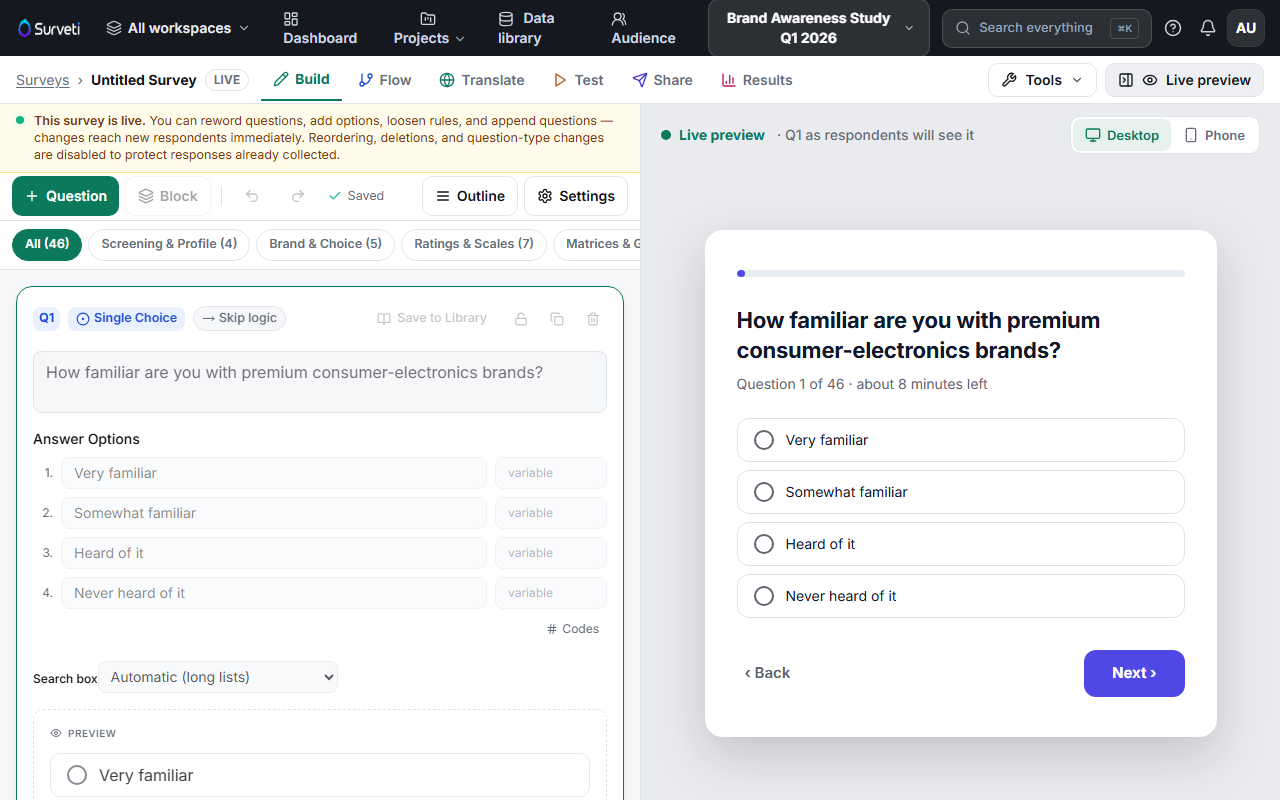
Click duplicate — an exact copy appears directly below the original, with the same options, validation, and design settings.
Edit what differs — usually just the question text. Everything else carries over, which is the point.
Tips
Tip: For questions you reuse across surveys (standard demographics, satisfaction batteries), use Save to Library instead — it adds the question to your Question Library, available from the Tools menu in any survey.
Note: Skip and display logic are copied too. If the original had logic rules, review them on the copy — a rule that says "skip to Q5" probably shouldn't fire from both questions.
Related articles
- How to Add a Question to Your Survey — adding from scratch
- Making a Question Required vs. Optional — settings that carry over on duplicate