Results & Analysis
Running AI Sentiment and Theme Extraction on Open-Ended Responses
Turn a pile of verbatim answers into sentiment scores and ranked themes with one AI run.
Overview
Turn a pile of verbatim answers into sentiment scores and ranked themes with one AI run — so you can read 100 open ends as a summary instead of a scroll.
Prerequisites
- An open-ended question with responses. Text analysis consumes your plan's AI credits.
Step-by-step
Open Text Analytics — go to Analysis → Text.
Select the survey and question — pick your survey, then the Open-Ended Question to analyze. The page loads the verbatims and shows Extracted 0 / N.
Click Run text analysis — the green button next to the Extracted counter.
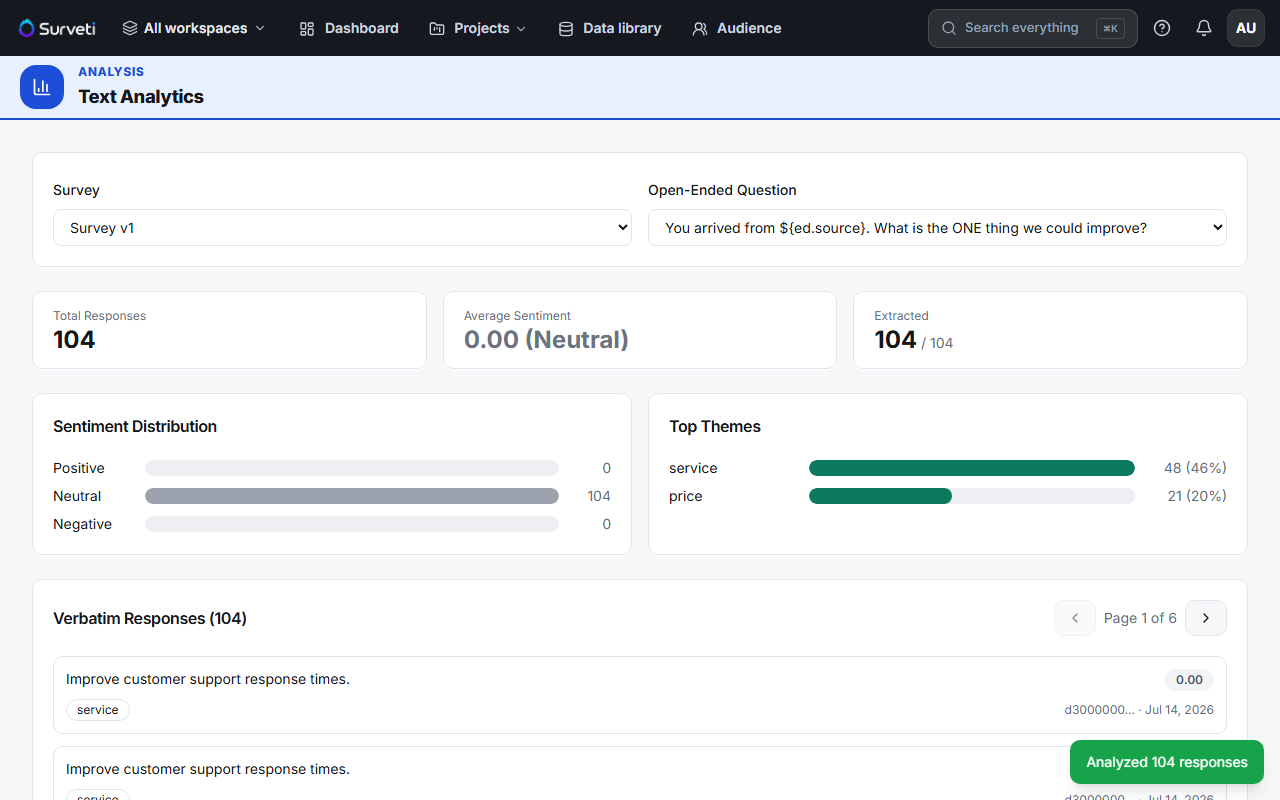
Wait for it to finish — a toast confirms how many responses were analyzed and Extracted climbs to N / N.
Read the output — Average Sentiment, a Sentiment Distribution (positive/neutral/negative), and Top Themes ranked by how many verbatims mention them.
Tips
Tip: Themes are the payoff. In the example, "service" appears in 46% of responses and "price" in 20% — that ranking tells you what to fix long before you've read a single verbatim yourself.
Note: Re-running costs credits again. Analyze once fieldwork is complete rather than repeatedly mid-field, unless you specifically need an early read.
Related articles
- Browsing Verbatim Responses and Sentiment Scores in the Text Analytics View — reading the results
- Adding an Open-Ended Essay Text Box to Your Survey — collecting good verbatims