Getting Started
How to Upgrade Your Plan
Upgrade your Surveti plan from the Billing & plan page whenever you need more responses, seats, projects, or features.
Overview
Upgrade your Surveti plan from the Billing & plan page whenever you need more responses, seats, projects, or features. Upgrades take effect immediately.
Prerequisites
- Only workspace Owners (and members with billing access) can change the plan.
Step-by-step
Open Billing & plan — click your avatar in the top-right corner, choose Settings, then Billing. The top card shows your current plan and this month's usage meters (completes, seats, projects, storage, AI credits).
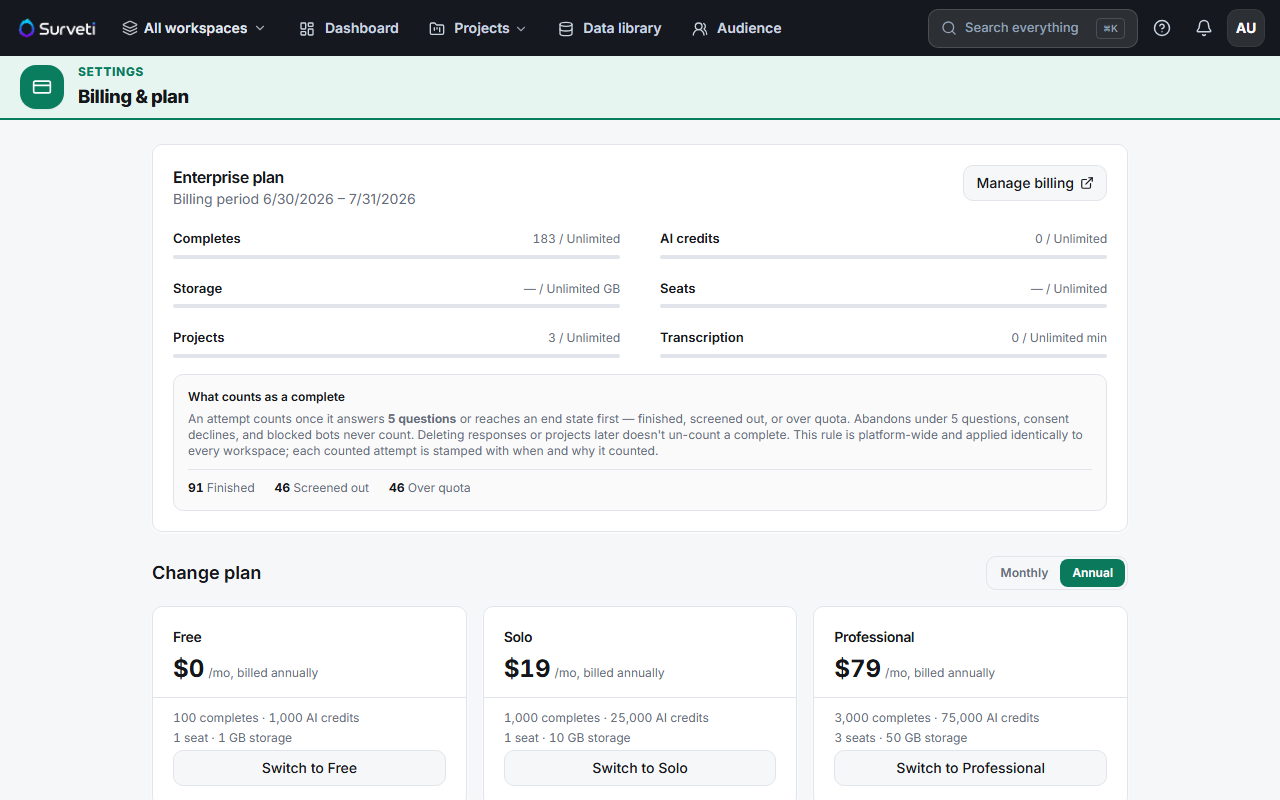
Compare plans under Change plan — each card lists its monthly completes, seats, storage, and AI credits. Use the Monthly / Annual toggle to compare prices; annual billing is discounted (for example, Professional is $99/month billed monthly or $79/month billed annually).
Click Switch to [plan] — confirm the change and complete checkout. Your new limits apply right away.
For Enterprise, contact sales — the Enterprise plan (unlimited quotas, SSO, custom domains) is quoted individually. Click Contact sales on the Enterprise card.
Key options
| Plan | Price (annual billing) | Highlights |
|---|---|---|
| Free | $0 | 100 completes/mo, 1 seat, 1 project/mo, 1 GB |
| Solo | $19/mo | 1,000 completes/mo, 1 seat, 3 projects/mo, email campaigns |
| Professional | $79/mo | 3,000 completes/mo, 3 seats + 2 viewers, advanced question types |
| Team | $199/mo ($149 annual) | 7,500 completes/mo, 5 seats + 5 viewers, custom domain add-on |
| Research Team | $449/mo ($349 annual) | 20,000 completes/mo, 10 seats + 10 viewers, MaxDiff & Conjoint |
| Enterprise | Custom | Unlimited quotas, SSO, priority support |
Tips
Tip: If you only need a little more of one thing, add-ons may be cheaper than upgrading: extra seats are $15/seat/month, 500 extra completes cost $25, and a 100 GB storage pack is $10/month.
Note: Use Manage billing on the same page to update your payment method or download invoices.
Related articles
- What Is Included in Each Billing Tier — the full plan comparison
- Understanding Monthly Response Limits by Plan — how completes are counted
- Inviting Team Members to Your Workspace — put those new seats to work