Distribution & Fieldwork
Using Merge Variables to Personalize Campaign Emails
Personalize campaign subject lines and bodies with merge variables like the recipient's first name and their unique survey link.
Overview
Personalize campaign subject lines and bodies with merge variables — the recipient's name, email, and their unique survey link — so every invitation reads as if written to one person.
Step-by-step
Open the composer — in the Share tab, go to Campaigns → New campaign.
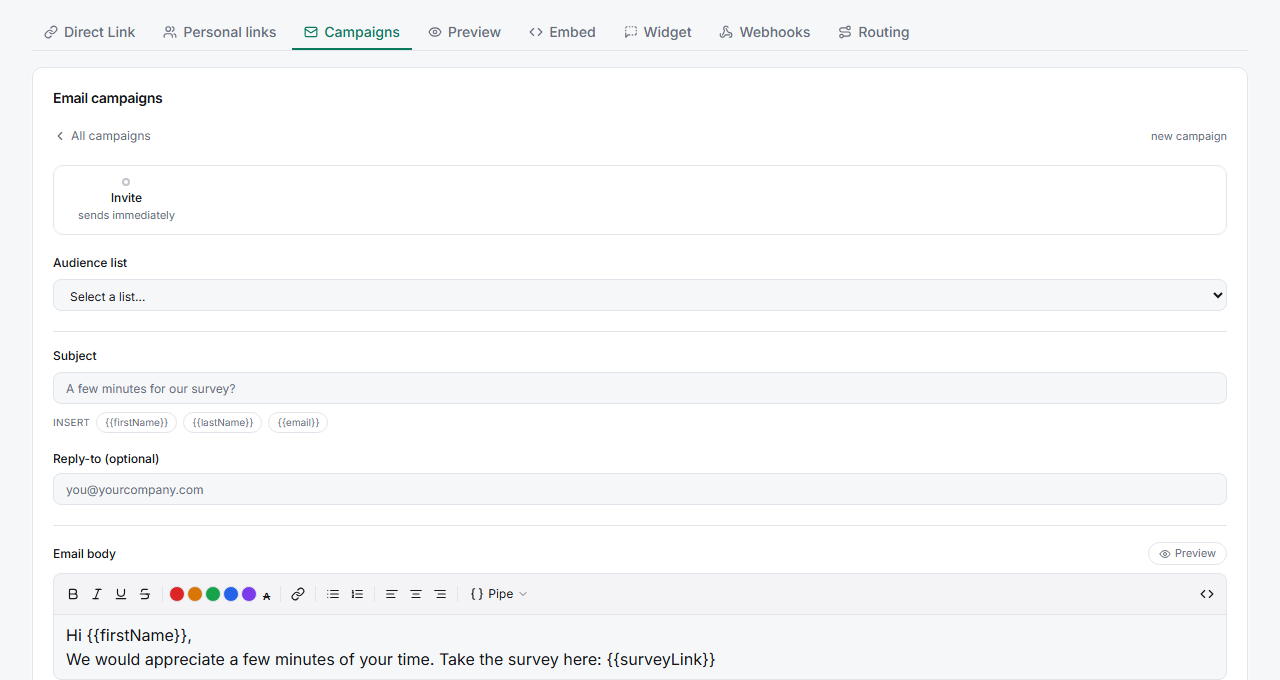
Insert tokens with the INSERT buttons — click a token to drop it at your cursor in the subject or body. At send time each token is replaced with that recipient's value.
Always include the survey link —
{{surveyLink}}inserts each recipient's unique, trackable link. It's required.
Key options
| Token | Replaced with |
|---|---|
{{firstName}} |
Recipient's first name |
{{lastName}} |
Recipient's last name |
{{email}} |
Recipient's email address |
{{surveyLink}} |
Their unique survey link (required) |
{{unsubscribeLink}} |
One-click unsubscribe link |
Tips
Tip: Include
{{unsubscribeLink}}— it keeps you compliant and protects your sending reputation. A recipient who can unsubscribe cleanly won't mark you as spam.
Note: If a contact has no first name on file,
{{firstName}}renders empty. Write greetings that still read well without it, or set a fallback by cleaning your list before import.
Related articles
- How to Create and Send Your First Email Campaign — the full flow
- Importing Contacts from a CSV File into a Contact List — where names come from