Distribution & Fieldwork
Sharing Your Survey with a Direct UUID-Based Link
Copy your survey's default direct link and share it anywhere — the simplest way to start collecting responses.
Overview
Copy your survey's default direct link and share it anywhere — email, chat, social, a slide. It's the fastest path to your first response.
Prerequisites
- A Live survey — see Publishing Your First Survey and Sharing the Link.
Step-by-step
Open the Share tab — in the builder, click Share. The Direct Link channel shows your survey's URL.
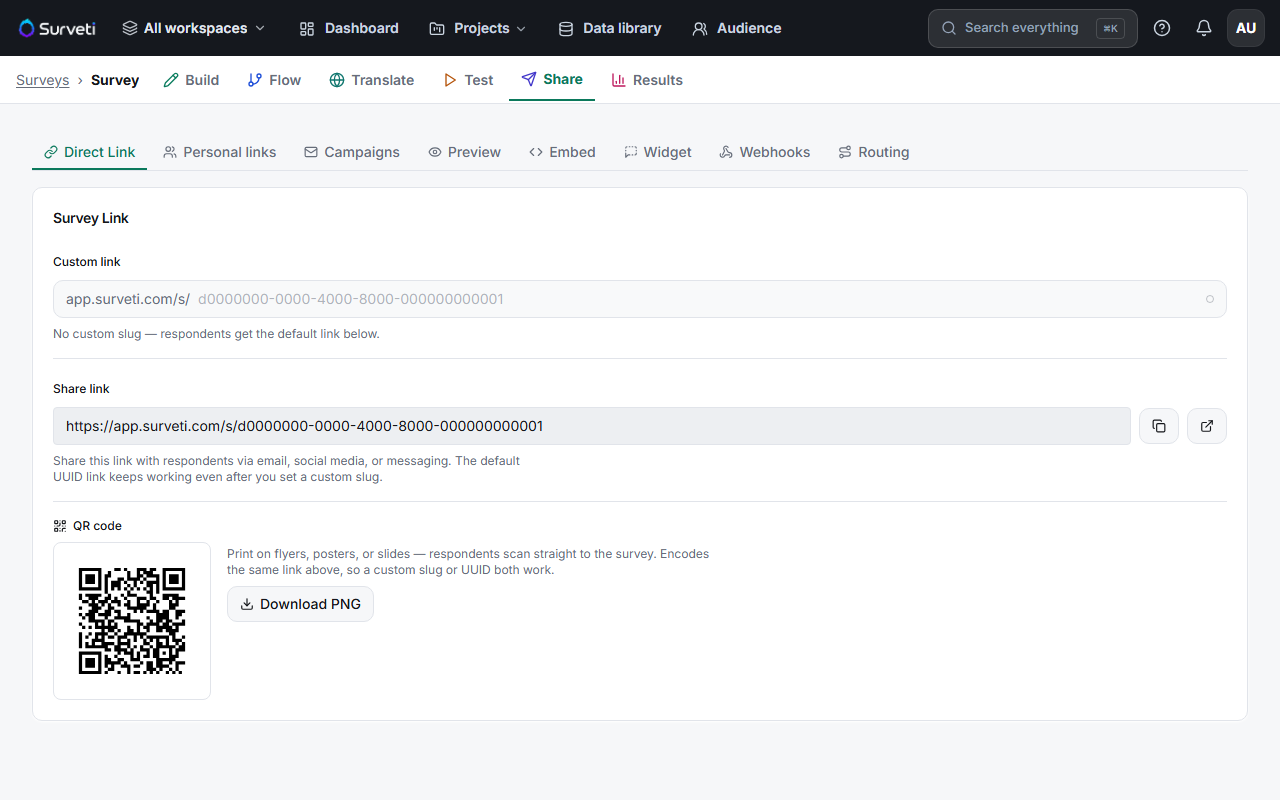
Copy the Share link — click the copy button. The default link uses your survey's unique ID (a UUID), so it's stable and always works.
Paste it anywhere — anyone with the link can respond while the survey is Live.
Tips
Tip: The default UUID link keeps working even after you add a custom vanity slug later, so you never have to re-share — both point to the same survey.
Note: A plain direct link is anonymous and shareable — you can't tell who responded. If you need to know, use personal links or an email campaign instead.
Related articles
- Creating a Memorable Vanity Slug for Your Survey URL — a prettier link
- Generating and Downloading a QR Code for Your Survey Link — for print and in-person
- Generating Personal Trackable Links in Bulk for Individual Contacts — know who responded