Distribution & Fieldwork
Scheduling Your Survey to Open and Close at Specific Dates and Times
Set a field window so your survey opens and closes automatically at the dates and times you choose.
Overview
Set a field window so your survey opens and closes automatically at the dates and times you choose — no need to be at your desk to flip it Live or shut it down.
Step-by-step
Open Survey settings — in the builder, go to Tools → Survey settings and find Field window (schedule).
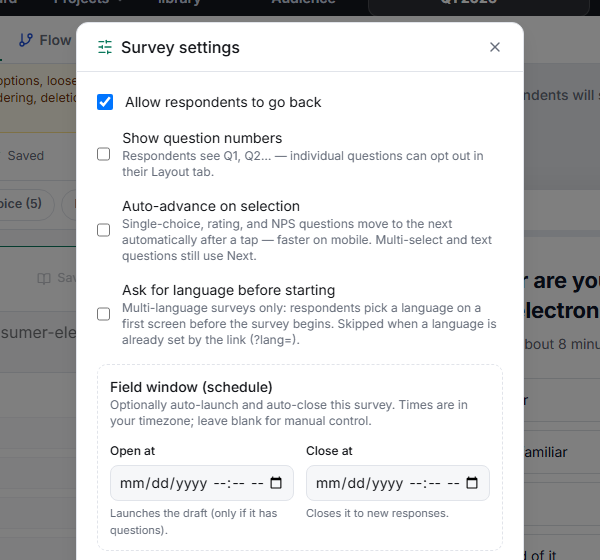
Set Open at — the date and time the survey should auto-launch. It launches the draft only if it has questions.
Set Close at — the date and time it should stop accepting new responses.
Leave either blank for manual control — set only a close time to launch now and auto-close, or only an open time to schedule a launch you'll close by hand.
Tips
Tip: Times are in your timezone — double-check that against where your respondents are. "Closes Friday 5pm" means very different things across regions for a global panel.
Note: The open time only launches a survey that actually has questions. A scheduled open on an empty draft does nothing — build first, then schedule.
Related articles
- Manually Launching a Survey from Draft to Live Status — go live by hand
- Understanding the Survey Status Machine and Valid State Transitions — the states behind the schedule