Distribution & Fieldwork
Manually Launching a Survey from Draft to Live Status
Take a survey Live by hand from the survey list when you're ready to start collecting responses.
Overview
Take a survey Live by hand from the survey list when you're ready to start collecting responses — the manual alternative to a scheduled field window.
Prerequisites
- A Draft survey with at least one question.
Step-by-step
Open the survey list — click Surveys in the top navigation.
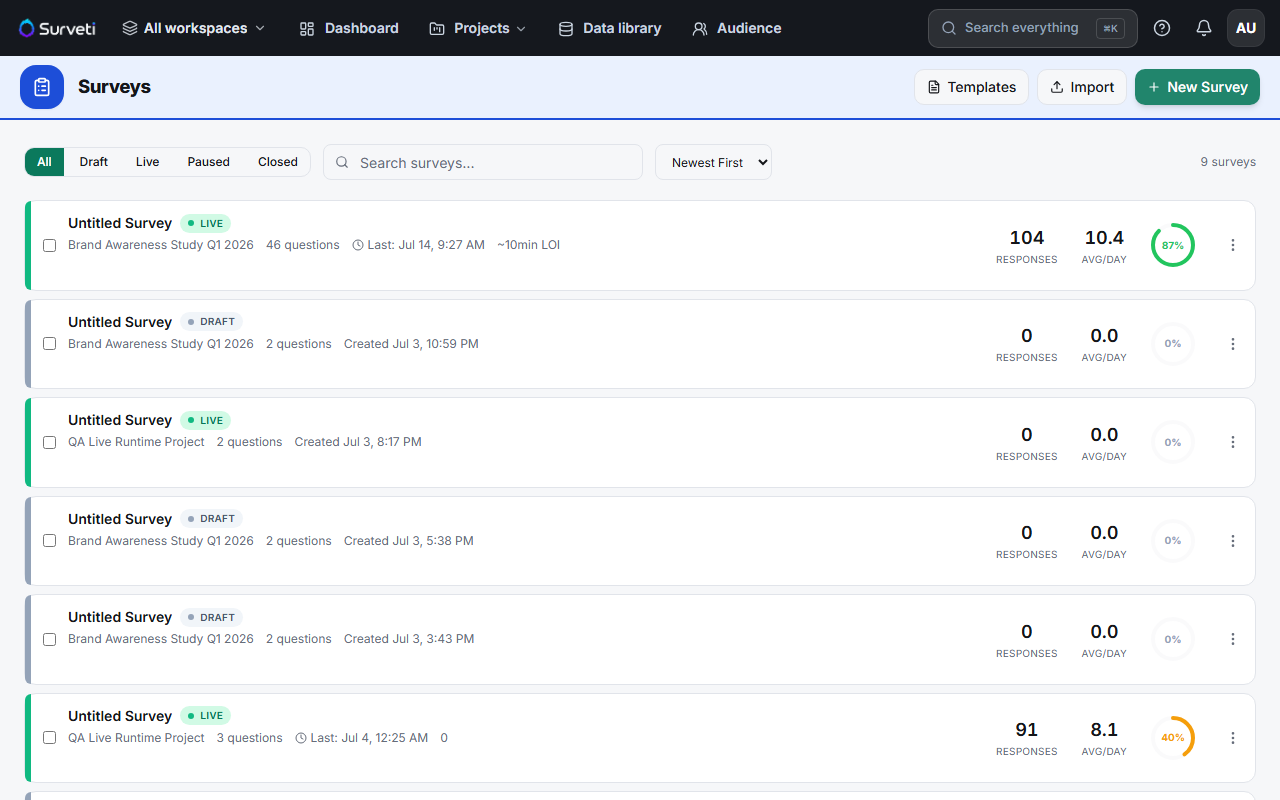
Open the row menu (⋯) — next to the Draft survey you want to launch.
Click Go Live — the status chip flips to Live and the survey link starts accepting responses immediately.
Tips
Tip: Do a final click-through in the Test tab right before going Live. Once it's collecting, editing is restricted to safe changes — it's much cheaper to catch a problem while still in Draft.
Note: A survey with no questions can't go Live. If Go Live is missing or disabled, check that the survey actually has content.
Related articles
- Scheduling Your Survey to Open and Close at Specific Dates and Times — automate the launch
- Understanding the Survey Status Machine and Valid State Transitions — Draft → Live and beyond