Distribution & Fieldwork
Generating and Downloading a QR Code for Your Survey Link
Download a QR code for your survey so respondents can scan straight to it from print, posters, packaging, or slides.
Overview
Download a QR code for your survey so respondents can scan straight to it from print, posters, packaging, or slides — no typing a URL.
Step-by-step
Open the Share tab — click Share, then Direct Link. Scroll to the QR code section.
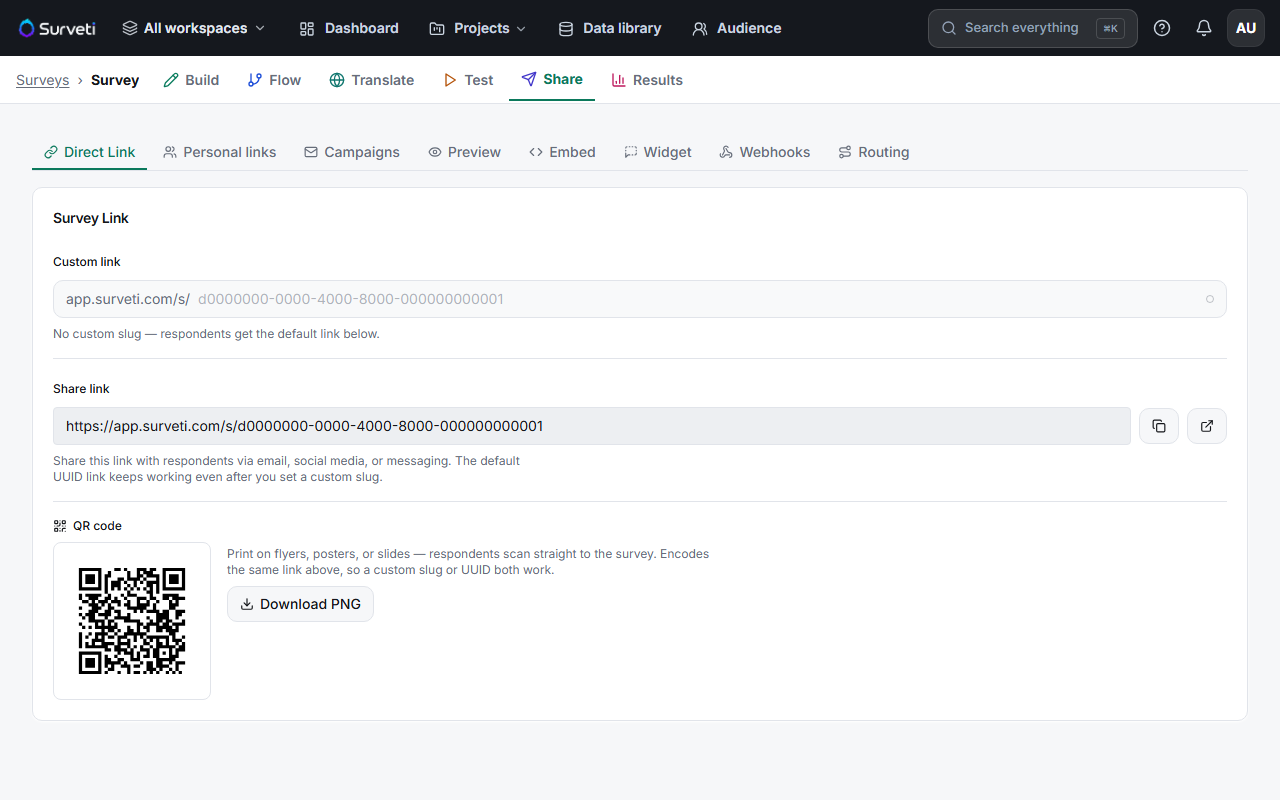
Download PNG — click Download PNG to save the QR image.
Place it — drop it onto a flyer, poster, table tent, product package, or presentation slide.
Tips
Tip: Add a one-line call to action next to the code ("Scan to share 2 minutes of feedback") — a bare QR code gets far fewer scans than one that tells people why to bother.
Note: The QR encodes the same link as your Share link, so a custom vanity slug or the default UUID both work. Set your slug before printing if you want a readable fallback URL under the code.
Related articles
- Sharing Your Survey with a Direct UUID-Based Link — the underlying link
- Creating a Memorable Vanity Slug for Your Survey URL — a readable URL to print alongside