Distribution & Fieldwork
Enabling CAPTCHA to Block Automated Bot Submissions at Survey Entry
Require a CAPTCHA challenge before respondents can enter, turning away bots on open links exposed to the public.
Overview
Require a CAPTCHA challenge before respondents can enter, turning away bots on open links exposed to the public. It's a front-door check for surveys you post where anyone — including automated traffic — can find them.
Step-by-step
Open the Routing channel — in the Share tab, click Routing.
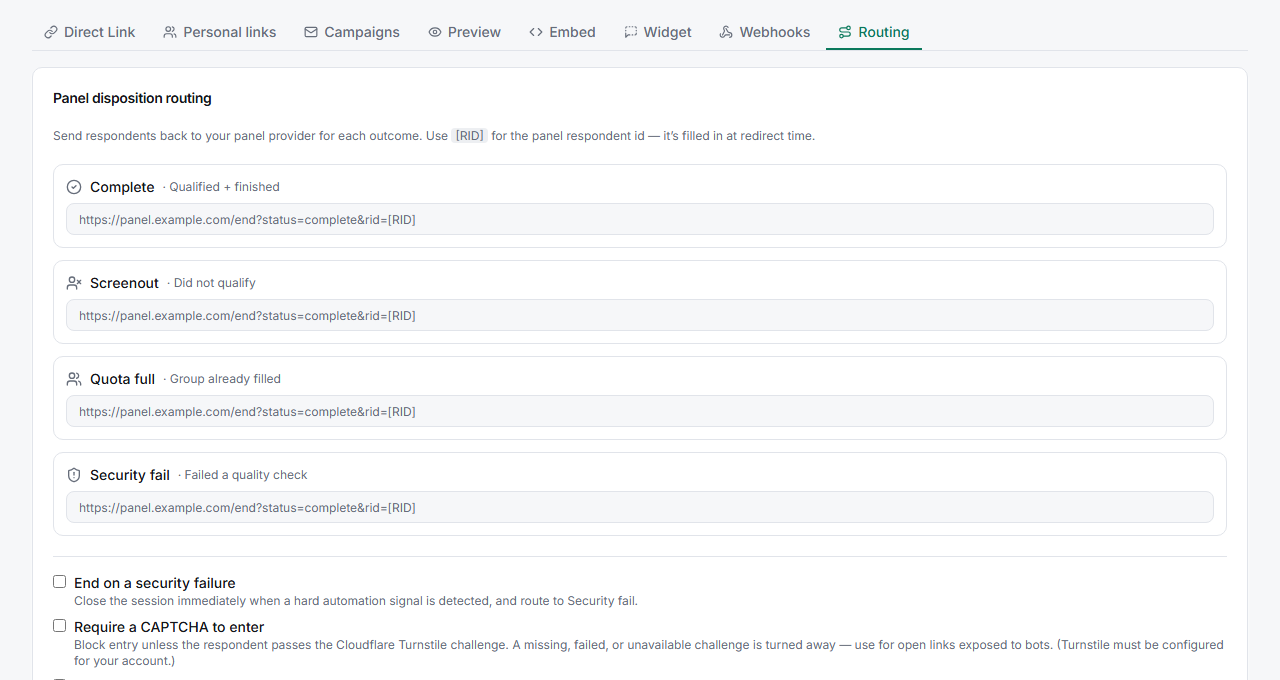
Enable Require a CAPTCHA to enter — tick the option. Entry is blocked unless the respondent passes the challenge; a missing, failed, or unavailable challenge is turned away.
Also consider End on a security failure — the adjacent option closes a session immediately when a hard automation signal is detected and routes it to Security fail.
Tips
Tip: Turn CAPTCHA on for public links (social, forums, open QR codes) where bot traffic is a real risk. For a closed email campaign to a known list, it's usually unnecessary friction.
Note: The CAPTCHA uses Cloudflare Turnstile, which must be configured for your account. If it isn't set up, the challenge can't run — confirm configuration before relying on it for a public launch.
Related articles
- Understanding the Fraud Signals That Cause a Respondent to Be Flagged — post-entry quality checks
- Preventing Duplicate Responses by Enabling Re-Entry Lock — stop repeat submissions