Distribution & Fieldwork
Embedding Your Survey in a Web Page with an iFrame Snippet
Embed your survey directly inside a web page with a copy-paste iframe snippet, so respondents answer without leaving your site.
Overview
Embed your survey directly inside a web page with a copy-paste iframe snippet, so respondents answer without leaving your site — great for feedback pages and help centers.
Step-by-step
Open the Embed channel — in the Share tab, click Embed.
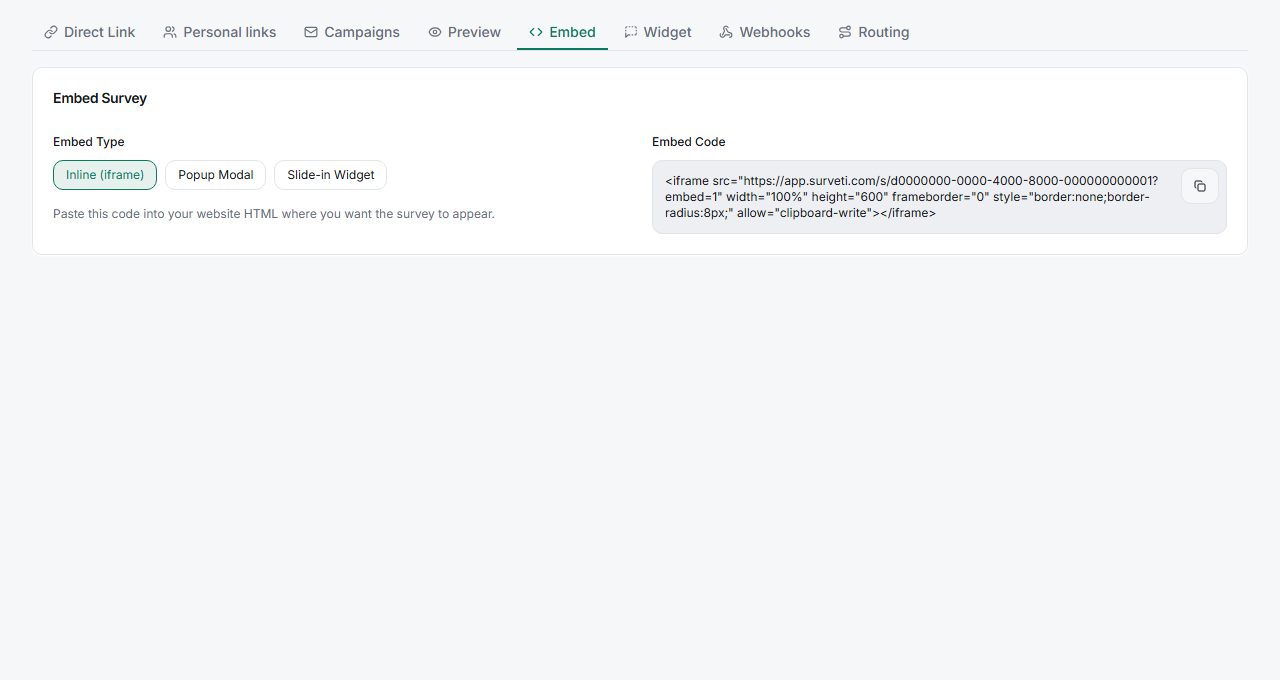
Choose Inline (iframe) — this is the default Embed Type. The Embed Code box shows a ready-to-paste
<iframe>snippet.Copy the snippet — click the copy button next to the code.
Paste it into your page — drop the
<iframe>into your site's HTML where you want the survey to appear. It renders inline at 100% width.
Tips
Tip: The default snippet sets
height="600". If your survey is long, increase the height so respondents don't scroll inside a cramped frame — or use the popup or slide-in options instead.
Note: Embedded surveys still need to be Live to accept responses, and they count against your response quota exactly like the direct link.
Related articles
- Adding a Pop-Up Modal Survey Overlay to Your Website — an overlay instead of inline
- Sharing Your Survey with a Direct UUID-Based Link — link instead of embed