Advanced Research
Running a Share-of-Preference Simulation with Conjoint Results
Test what-if product configurations against each other and see the preference share each would win.
Overview
Test what-if product configurations against each other and see the preference share each would win. This is where conjoint pays off — turning utilities into a decision.
Prerequisites
- A fielded conjoint question with a converged fit — see Running MNL Utility Estimation on Conjoint Response Data.
Step-by-step
Open the conjoint card in Results and scroll to SHARE-OF-PREFERENCE SIMULATOR.
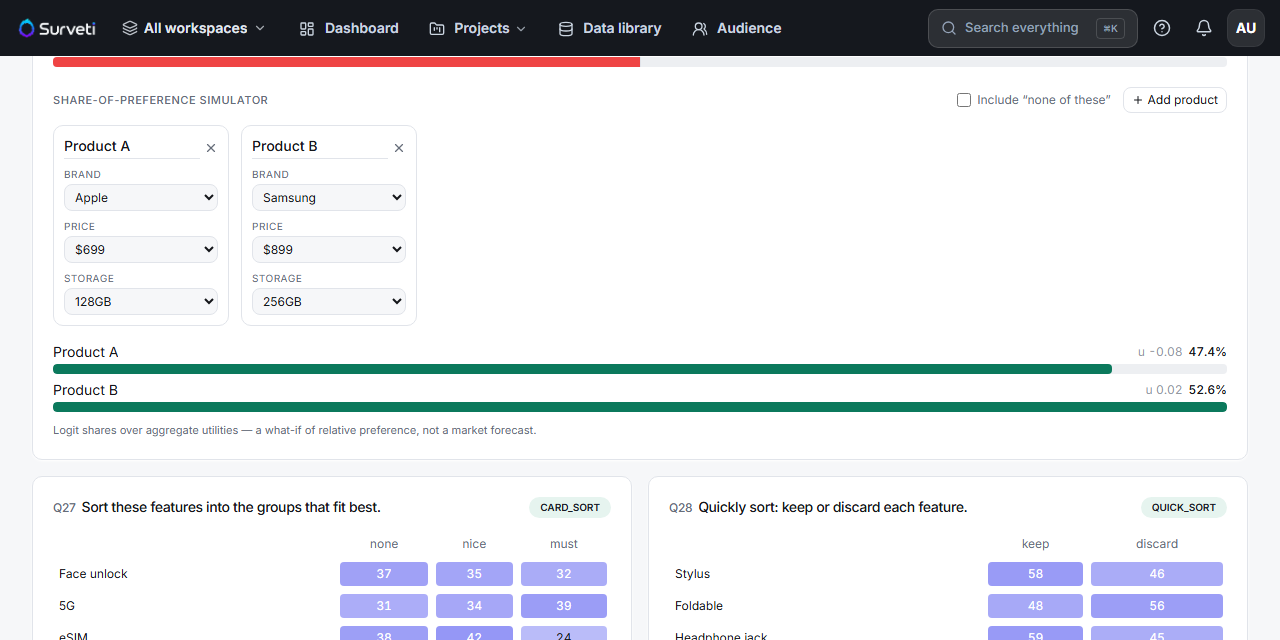
Configure the products — each product card has a dropdown per attribute. Set Product A to one configuration and Product B to its rival.
Add more products — click + Add product (up to 8 total).
Include "none of these" if relevant — tick the checkbox to add the no-purchase option, so shares reflect people who'd walk away.
Read the shares — each product's bar shows its preference share (e.g. Product A 47.4% vs Product B 52.6%) and its total utility.
Tips
Tip: Simulate the decision you're actually facing — your current product vs the proposed change vs the competitor. Shares between realistic rivals are far more useful than shares between hypothetical extremes.
Note: As the panel says: logit shares over aggregate utilities — a what-if of relative preference, not a market forecast. It ignores distribution, awareness, and marketing, and it's an aggregate model, so it can't capture segment-specific behavior. Use it to rank options, not to predict revenue.
Related articles
- Building Product Profiles for the Conjoint Preference Simulator — configuring products well
- Interpreting Part-Worth Utilities from MNL Output — what drives the shares