Advanced Research
Interpreting Part-Worth Utilities from MNL Output
Read the part-worth utility for each level — what the numbers mean, why they're centered on zero, and how to use the standard errors.
Overview
Read the part-worth utility for each level — what the numbers mean, why they're centered on zero, and how to use the standard errors beside them.
Step-by-step
Open the conjoint card in Results and find AGGREGATE LOGIT UTILITIES.
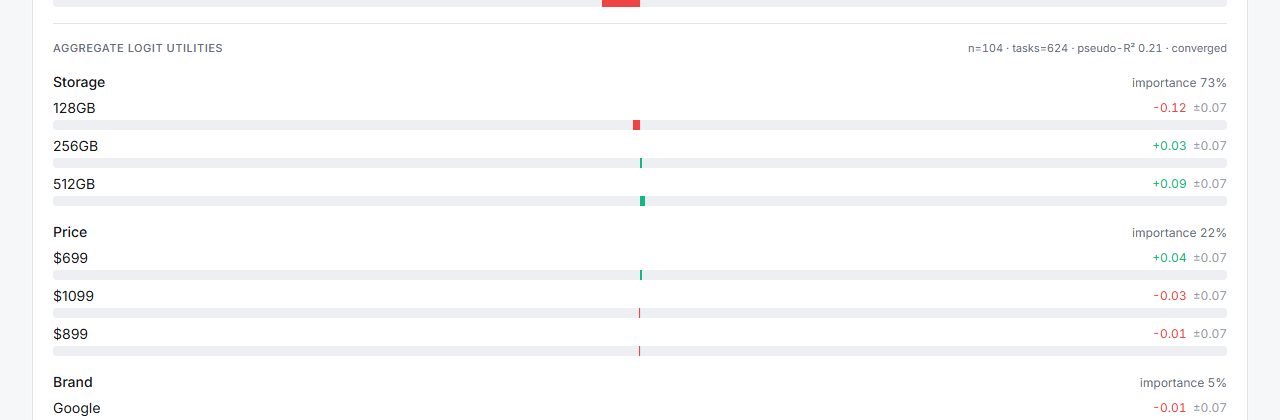
Read each level's utility — e.g. Storage: 128GB −0.12 ±0.07, 256GB +0.03 ±0.07, 512GB +0.09 ±0.07.
Read the sign against zero — utilities are zero-centered within each attribute, so positive means "preferred relative to that attribute's average", negative means the opposite.
Compare within an attribute, never across — the gap between 128GB and 512GB is meaningful. "Storage 512GB (+0.09) vs Price $699 (+0.04)" is not a valid comparison; that's what importance scores are for.
Use the ± standard error — if two levels' utilities are within about one SE of each other, treat them as effectively tied.
Tips
Tip: Look at the ordering first. Utilities that don't follow a sensible monotonic order where they should — e.g. a higher price scoring better than a lower one — usually signal a design or sample problem, not a genuine insight.
Note: Utilities live on the logit scale. They're not dollars, not percentages, and not ratios — a +0.09 isn't "9% better". They only mean something relative to other levels in the same attribute, or run through the simulator.
Related articles
- Running MNL Utility Estimation on Conjoint Response Data — the fit behind the numbers
- Understanding Attribute Importance Scores in Conjoint Analysis — comparing attributes
- Running a Share-of-Preference Simulation with Conjoint Results — turning utilities into shares