Advanced Research
Getting Started with MaxDiff Best-Worst Scaling in Surveti
Use MaxDiff to force real trade-offs across a long list of items — and get a clean priority ranking out the other side.
Overview
Use MaxDiff to force real trade-offs across a long list of items — and get a clean priority ranking out the other side. It's the cure for rating scales where everything comes back "very important".
Prerequisites
- MaxDiff requires the Research Team plan or above.
How MaxDiff works
Respondents see a small subset of your items (a "set") and pick the most and least important. Repeat across several sets with rotating items, and every item gets compared against the others. The result is a ranked scale with real separation — because people had to choose.
Step-by-step
Add the question — click + Question and choose MaxDiff.
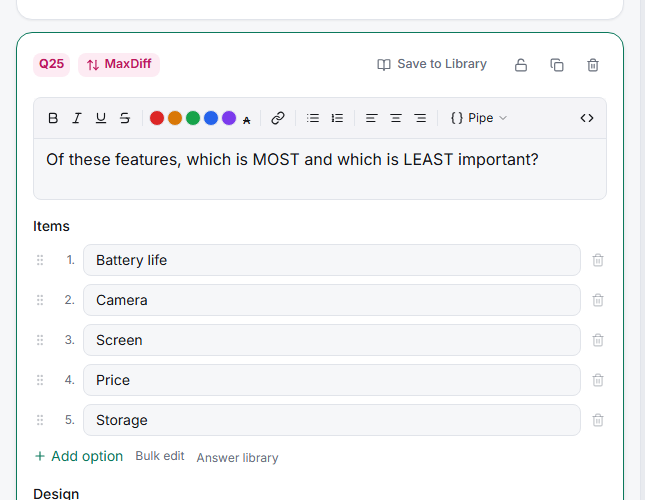
Add your Items — the full list to prioritize (features, messages, benefits).
Set the design — Items per set (how many show at once) and Number of sets (how many screens each respondent does).
Write the Anchor prompt — the wording that frames the trade-off ("Which is MOST / LEAST important to you?").
Field and read the scores — Results reports best-minus-worst scores ranked by item.
Tips
Tip: MaxDiff shines exactly where rating scales fail. If a previous survey told you 9 of 12 features are "important", MaxDiff will tell you which 3 actually win when people can't have everything.
Note: MaxDiff ranks items against each other — it can't tell you whether any of them are good in absolute terms. It answers "which matters most", not "is this enough".
Related articles
- Setting Item Count and Items Per Set in a MaxDiff Study — design sizing
- Interpreting Best-Worst Score as a MaxDiff Preference Output — reading the output
- Getting Started with Choice-Based Conjoint in Surveti — when you need trade-offs between configurations