Advanced Research
Getting Started with Choice-Based Conjoint in Surveti
Learn what choice-based conjoint measures and how to add your first CBC question to a survey.
Overview
Learn what choice-based conjoint (CBC) measures and how to add your first CBC question. Instead of asking what people say they want, CBC watches what they choose — and infers what drove the choice.
Prerequisites
- Conjoint questions require the Research Team plan or above.
How CBC works
Respondents see several product profiles side by side and pick one, repeatedly. Each profile is a combination of attributes (Brand, Price, Storage) at different levels ($699 / $899 / $1099). Because the combinations vary systematically, the choices reveal how much each attribute and level actually drove the decision.
Step-by-step
Add the question — click + Question and choose Conjoint.
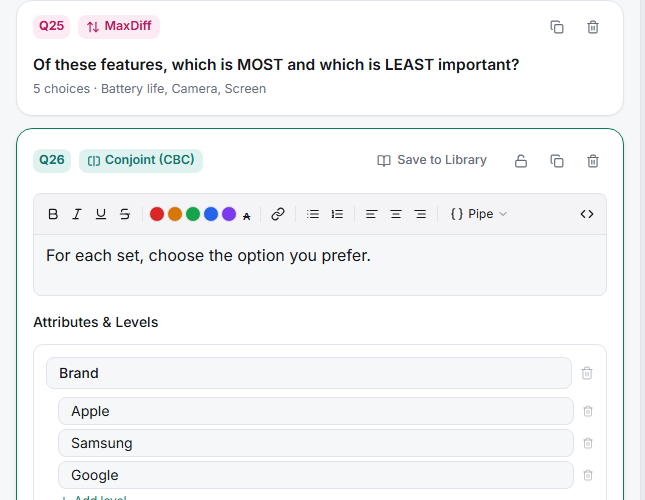
Define attributes and levels — under Attributes & Levels, add each attribute and its levels.
Set the design — choose Number of tasks (how many choice sets each respondent sees) and Cards per task (profiles per set). Watch the Design quality indicator.
Field the survey and analyze — once responses arrive, the Results card shows utilities and a share simulator automatically.
Tips
Tip: CBC earns its complexity when you're deciding between real trade-offs — pricing and packaging especially. If you just need to know which features people like, a MaxDiff or a ranking question is cheaper for you and easier on respondents.
Note: Keep it small. Every extra attribute and level makes the design harder to estimate and the task more tiring — see How Many Attributes Should Your Conjoint Study Include.
Related articles
- Defining Attributes and Levels for a CBC Study — the build detail
- Choosing the Right Number of Tasks and Cards Per Task — design sizing
- Research Team Plan Requirement for Conjoint Questions — the plan gate