Advanced Research
Choosing a Scale Preset from 3-Point Through 11-Point Options
Pick the number of scale points that matches the precision you need and the effort you're asking for.
Overview
Pick the number of scale points that matches the precision you need and the effort you're asking for. Surveti offers presets at 3, 5, 7, 10, and 11 points.
Step-by-step
Open your Scale question in the builder.
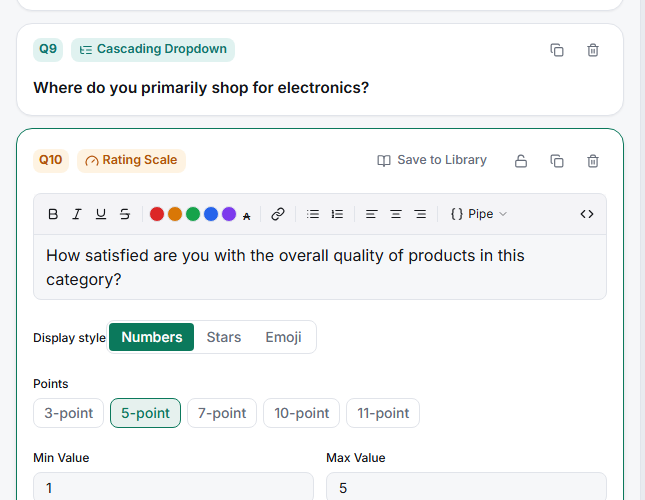
Click a Points preset — the minimum stays at 1 and the preset sets the maximum.
Adjust Min/Max Value manually if you need a non-standard range.
Label the points — at minimum the anchors; ideally every point on shorter scales.
Which preset to use
| Points | Best for |
|---|---|
| 3 | Quick, low-effort checks; mobile-first; simple direction (worse / same / better) |
| 5 | The default — enough resolution to move, few enough to label fully |
| 7 | More sensitivity when you'll track small changes over time |
| 10 / 11 | Fine-grained scoring; 11-point (0–10) matches NPS-style conventions |
Tips
Tip: When in doubt, use 5. It's fully labelable, it reads well on a phone, and it's what most benchmarks and past trackers use — which matters more than a marginal gain in sensitivity.
Note: Whatever you pick, keep it identical across waves and across questions you'll compare. Changing a tracker from 5-point to 7-point mid-flight breaks your trend line; the numbers are not convertible.
Related articles
- Setting Up a Labeled Likert Scale with Per-Point Labels — labeling the points
- Choosing Between Numeric Star and Emoji Scale Display Styles — how it looks