Account & Billing
When to Upgrade from the Free Plan to Solo
Updated
Know the signals that mean you've outgrown Free — and exactly what Solo adds for $29 a month.
All Account & Billing articles
Overview
Know the signals that mean you've outgrown Free — and exactly what Solo adds for $29/month ($19 billed annually).
Signs you've outgrown Free
- You hit the 100-completes cap. On Free, collection stops once you reach 100 completes for the month. Solo raises this to 1,000.
- You need to email invitations. Free includes no campaign emails; Solo includes 2,500/month.
- You want more than one project a month. Free allows 1; Solo allows 3.
- You need randomization or crosstabs. Both unlock on Solo.
- You want support tickets. Free is knowledge-base only; Solo adds standard tickets.
What Solo adds
| Free | Solo | |
|---|---|---|
| Completes / month | 100 | 1,000 |
| Projects / month | 1 | 3 |
| Campaign emails | — | 2,500 |
| Storage | 1 GB | 10 GB |
| AI credits | 1,000 | 25,000 |
| Features | Core types | + randomization, crosstabs, advanced validation, support tickets |
Step-by-step
Check your usage — Settings → Billing shows completes used this period.
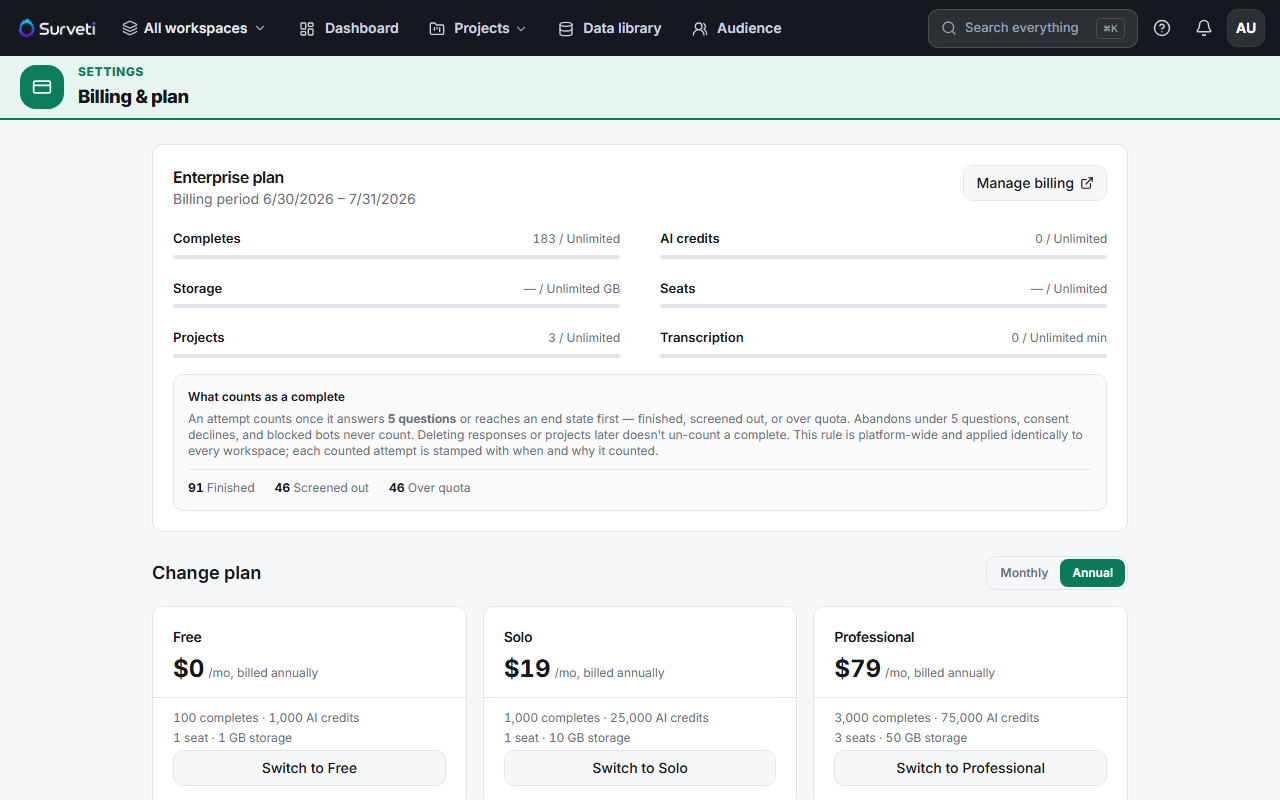
Switch to Solo — under Change plan, click Switch to Solo and complete checkout.
Tips
Tip: If you're new to Surveti, your first paid plan starts with a 14-day free trial — see Starting a 14-Day Free Trial on a Paid Plan.
Note: Solo still includes only 1 builder seat and no viewer seats. If you need to collaborate, Professional (3 seats + 2 viewers) is the real team step — Solo is for individuals.
Related articles
- What Happens When You Hit Your Free Plan Response Cap — the cap in detail
- What Is Included in the Professional Plan — if you need seats
- Starting a 14-Day Free Trial on a Paid Plan — try before you pay