Account & Billing
Switching Between Monthly and Annual Billing Cycles
Change how often you're billed — the toggle at checkout for new subscriptions, the billing portal for existing ones.
Overview
Change how often you're billed. Which route you take depends on whether you already have a subscription.
Step-by-step
If you're subscribing for the first time
Open Settings → Billing and go to Change plan.
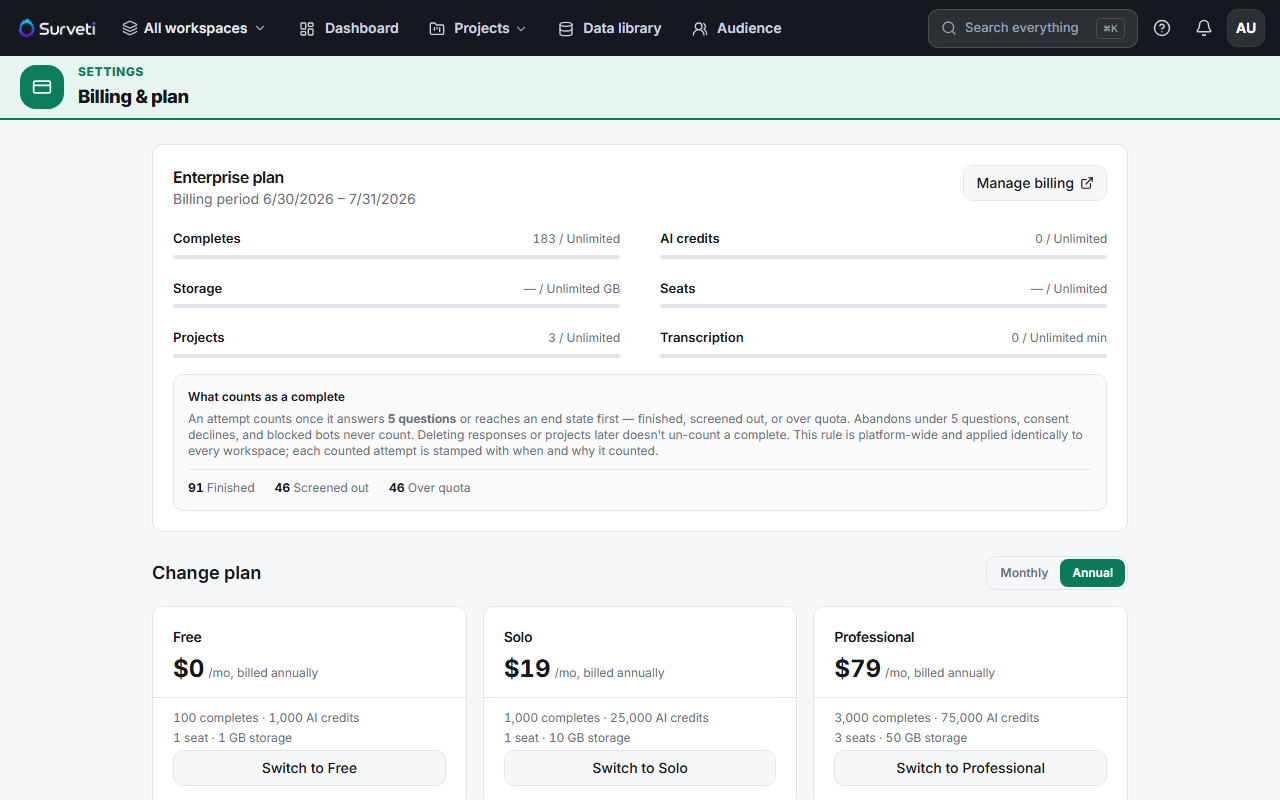
Set the Monthly / Annual toggle before choosing a plan — the toggle determines which price checkout uses.
Click Switch to [plan] and complete checkout.
If you already have a subscription
Click Manage billing — this opens the Stripe billing portal.
Change your cycle there — Surveti hands cycle and plan changes for existing subscribers to the portal, which applies Stripe's proration rules.
Tips
Tip: Switching monthly → annual mid-term doesn't waste what you've paid. Stripe prorates: your unused monthly time is credited against the annual charge.
Note: Attempting to start a second checkout while a subscription is live is rejected with "A subscription already exists — use the billing portal to change plans." That's expected — the portal is the right door once you're subscribed.
Related articles
- Annual Billing Discounts Across All Paid Plan Tiers — what you save
- Upgrading Your Plan and How Prorated Billing Works — proration explained
- Updating Your Payment Method via the Stripe Billing Portal — the portal