Account & Billing
How Builder Seats and Viewer Seats Differ in Surveti
Surveti counts two kinds of seat — understand which roles consume which, so you don't buy the wrong one.
Overview
Surveti counts two kinds of seat, and roles map onto them automatically. Getting this right is usually the difference between upgrading and not.
The two seat pools
| Seat type | Roles that consume it | What they can do |
|---|---|---|
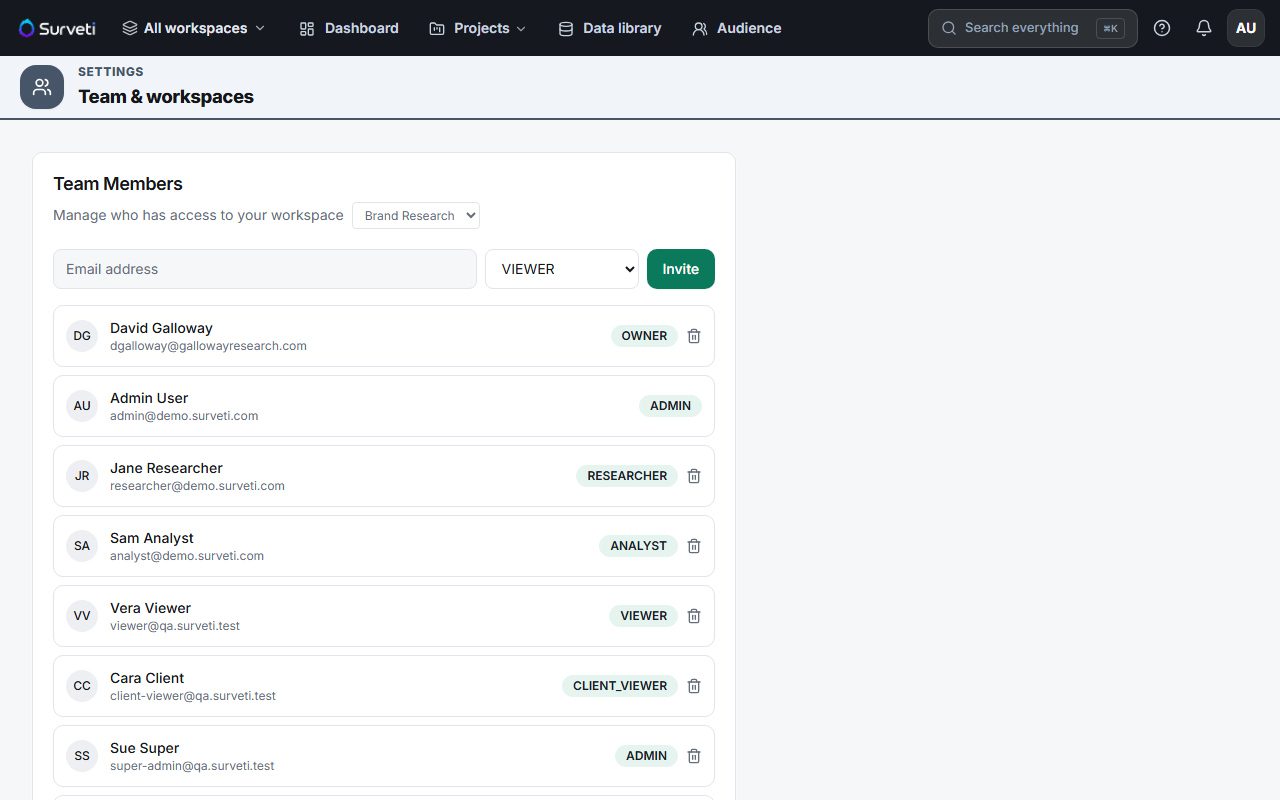
| Full (builder) seat | Owner, Admin, Researcher, Analyst | Build, field, and analyze |
| Viewer seat | Viewer, Client Viewer | Read-only access |
How counting works
A person occupies one seat per tenant, not one per workspace. If someone holds any non-viewer role anywhere in your organization, they take a full seat. If all their roles are viewer-class, they take a viewer seat.
Included by plan
| Plan | Full seats | Viewer seats |
|---|---|---|
| Free / Solo | 1 | 0 |
| Professional | 3 | 2 |
| Team | 5 | 5 |
| Research Team | 10 | 10 |
| Enterprise | Unlimited | Unlimited |
Tips
Tip: Before buying a builder seat at $15/month, ask what the person actually does. Stakeholders who only read results should be Viewer or Client Viewer — those use the separate viewer pool and cost nothing extra.
Note: Adding someone to a second workspace doesn't cost a second seat. Seats are counted per distinct user across the tenant.
Related articles
- Adding Extra Builder Seats as a Monthly Add-On — buying more
- Understanding the Six Workspace Roles in Surveti — which role to give
- Full Builder Seat Counts Included in Each Plan Tier — by plan