Question Types
Validating Email Phone and URL Formats in an Open Text Question
Make an open text question accept only a valid email, phone number, or website URL so contact data arrives clean.
Overview
Make an open text question accept only a valid email, phone number, or website URL so contact data arrives clean — no more "call me maybe" in a phone field.
Step-by-step
Add an Open Text question — click + Question and choose Open Text.
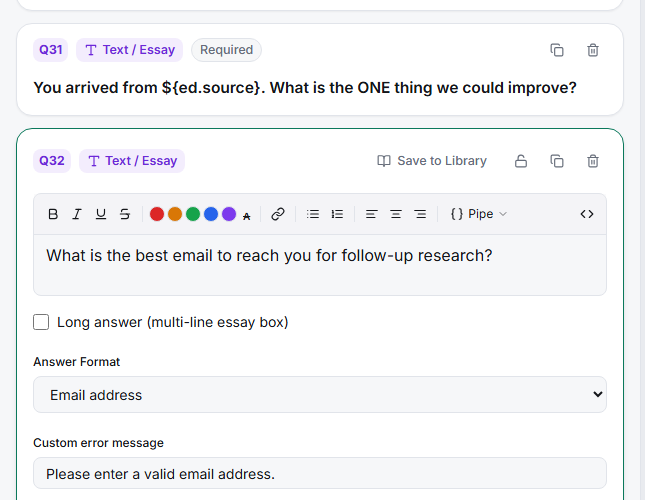
Set the Answer Format — open the Answer Format dropdown and choose the format you need: Email address, Phone number, or Website URL.
Let validation do the checking — the taker rejects malformed input and prompts the respondent to fix it before continuing, so you never store a broken email.
Key options
| Format | Accepts |
|---|---|
| Email address | A valid email like name@company.com |
| Phone number | A valid phone number |
| Website URL | A valid http/https URL |
| Postal / ZIP code, US State, Custom pattern (RegEx) | Other structured formats |
Tips
Tip: For a full set of contact details (name + email + phone + address), don't chain several validated text questions — use the Contact Form question type, which bundles them with per-field validation. See Setting Up a Contact Form to Collect Name Email and Address.
Note: Validation checks format, not deliverability — a syntactically valid email can still bounce. Treat collected addresses as candidates, not confirmed.
Related articles
- Restricting an Open Text Question to Numeric Input Only — numeric formats
- Setting Up a Contact Form to Collect Name Email and Address — multi-field contact capture