Question Types
Using Header and Descriptive Blocks to Structure Your Survey
Add non-question elements — section headers and descriptive text — to give your survey structure and guide respondents.
Overview
Add non-question elements — section headers and descriptive text — to give your survey structure and guide respondents. They collect no data; their job is to orient.
Step-by-step
Add the element — click + Question and choose Header (a section title) or Descriptive (a paragraph of instructions or context).
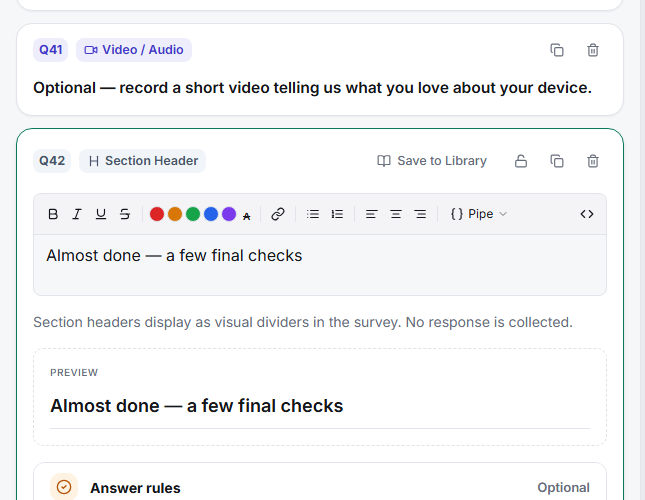
Write the copy — a header announces a new section ("A few final checks"); a descriptive block sets up the questions that follow ("The next questions are about pricing").
Place it before the section it introduces — headers and descriptive text belong at the top of the group they describe, not scattered between unrelated questions.
Key options
| Element | Use for |
|---|---|
| Header | A short section title that breaks the survey into chapters |
| Descriptive | A paragraph of context or instructions before a group of questions |
Tips
Tip: Use headers to signal progress through a long survey — respondents who can see the survey is organized into sections feel it's shorter and are less likely to abandon.
Note: These elements never appear in results because they collect nothing. If you need respondents to actively agree to something, use a consent screen or a question, not a descriptive block.
Related articles
- How to Add and Name Survey Blocks — the structural layer above headers
- Editing the Survey Welcome Screen and Start Button Text — front-of-survey context