Question Types
Setting Up a Net Promoter Score Question
Add the dedicated NPS question type — the 0–10 recommend scale that auto-computes promoters, passives, and detractors.
Overview
Add the dedicated NPS question type — the 0–10 recommend scale that auto-computes promoters, passives, and detractors. Because it's a real type (not a generic 0–10 scale), Results gives you the standard breakdown for free.
Step-by-step
Add the question — click + Question and choose NPS.
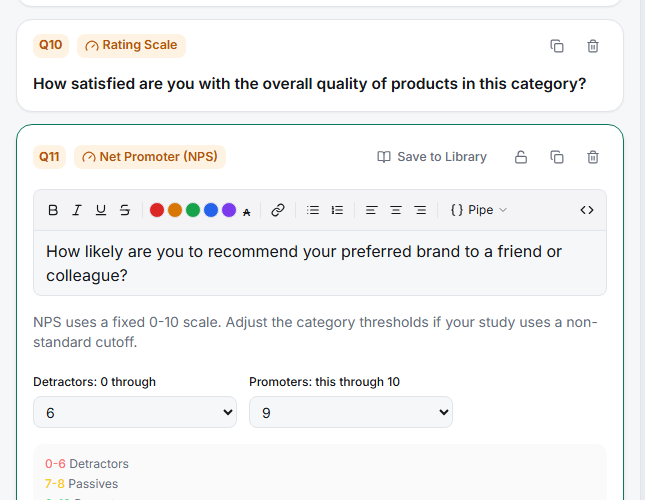
Keep the canonical wording — "How likely are you to recommend [brand/product] to a friend or colleague?" Standard wording is what makes your score comparable to benchmarks and to your own past waves.
Confirm the anchors — 0 = "Not at all likely", 10 = "Extremely likely". The type sets these for you.
Read the segments — Results classifies 0–6 as detractors, 7–8 as passives, 9–10 as promoters, and shows NPS = %promoters − %detractors.
Key options
| Segment | Score range |
|---|---|
| Detractors | 0–6 |
| Passives | 7–8 |
| Promoters | 9–10 |
Tips
Tip: One NPS per survey, asked early. It's a relationship metric — burying it after feature questions or repeating it per sub-product distorts the number.
Note: To understand why people score the way they do, pair NPS with a follow-up — see Adding Conditional Follow-Up Prompts by NPS Respondent Segment.
Related articles
- Adding Conditional Follow-Up Prompts by NPS Respondent Segment — ask detractors what went wrong
- Adding Low Mid and High Anchor Labels to a Likert Scale — for non-NPS scales