Question Types
Setting Up a Drag-and-Drop Ranking Question
Ask respondents to order items by preference with a drag-and-drop ranking question — forcing real trade-offs a rating scale can't.
Overview
Ask respondents to order items by preference with a drag-and-drop ranking question — forcing real trade-offs a rating scale can't. When everything rates "important", ranking reveals what actually wins.
Step-by-step
Add the question — click + Question and choose Ranking.
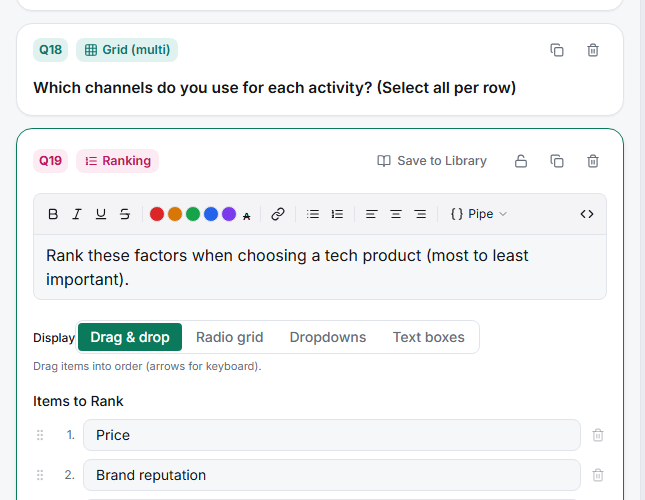
List the Items to Rank — one per row. Respondents drag them into order in the taker.
Choose the Display — drag-and-drop handles for a tactile order, and check how it renders on Phone in the live preview.
Keep the list short — 4–6 items is the sweet spot. Beyond ~7, ranking becomes guesswork below the top few and the tail data is noise.
Tips
Tip: If you only care about the top choices, a ranking of 5 items still gives you clean "what's #1 and #2" data even if the bottom of the list is fuzzy — but don't over-interpret ranks 4–7.
Note: Ranking forces a complete order with no ties. If respondents genuinely rate several items equally, MaxDiff (best–worst) may fit better — it's designed for trade-offs across larger sets.
Related articles
- How to Set Up a MaxDiff Best-Worst Scaling Question — trade-offs across many items
- How to Use Constant Sum for Budget Allocation — allocate a fixed total instead of ordering