Question Types
Configuring Min Max and Step Values on a Slider Question
Set a slider's range and increment — min, max, step, and start position — to collect a precise number on a visual control.
Overview
Set a slider's range and increment — min, max, step, and start position — to collect a precise number on a visual control. Sliders suit magnitudes people feel more than count: price, likelihood, intensity.
Step-by-step
Add the question — click + Question and choose Slider.
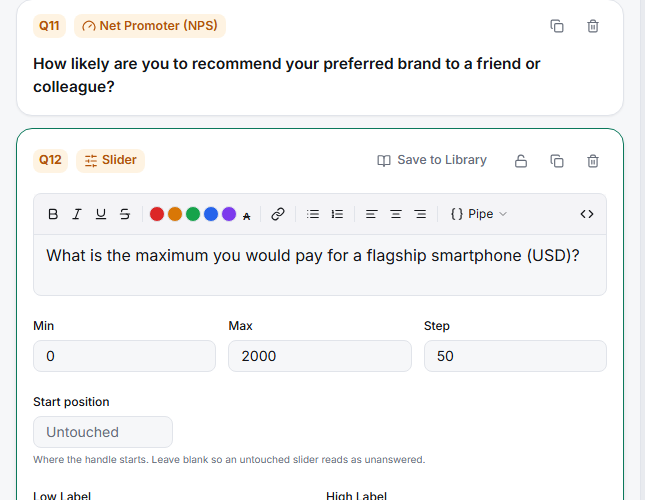
Set Min and Max — the range endpoints (e.g. 0 and 1000 for a price question).
Set the Step — the increment the handle moves by. Step 1 gives whole numbers; step 50 snaps to 0, 50, 100…
Set the Start position — where the handle sits before the respondent moves it (or leave it Untouched so you can tell who didn't answer).
Label the ends — fill in Low Label and High Label so the extremes are meaningful ("Not at all" / "Completely").
Key options
| Field | What it does |
|---|---|
| Min / Max | The slider's numeric range |
| Step | The increment between valid values |
| Start position | Initial handle position (or Untouched) |
| Low / High Label | Words for the two ends |
Tips
Tip: Leave the start position Untouched rather than at the midpoint — a pre-set midpoint gets recorded as a real answer from respondents who never engaged, biasing your average toward the middle.
Note: Choose a step that matches the precision you'll actually analyze. A 0–1000 slider with step 1 implies false precision; step 50 or 100 collects cleaner, more honest data.
Related articles
- How to Add and Configure a Rating Scale Question — discrete points instead of a slider
- Configuring Min Max and Step Values on a Slider Question