Question Types
Collecting Webcam Video Responses from Survey Participants
Ask respondents to record a webcam video or audio answer for richer, qualitative feedback.
Overview
Ask respondents to record a webcam video or audio answer for richer, qualitative feedback than text can capture — tone, expression, and detail in the respondent's own voice.
Prerequisites
- Video Response is available on the Professional plan and above; recordings count toward your plan's storage.
Step-by-step
Add the question — click + Question and choose Video Response.
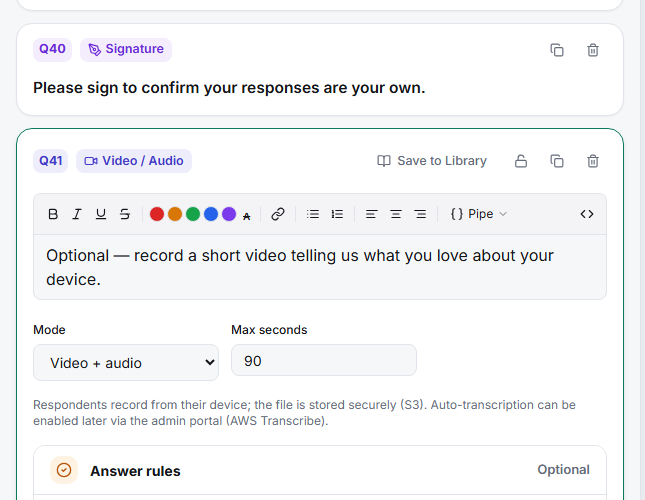
Pick the Mode — Video + audio for a webcam recording, or Audio only when you just need voice (lower friction, smaller files).
Set Max seconds — cap the recording length so answers stay focused and files stay manageable.
Ask a specific prompt — "Show us how you currently solve this" gets a usable clip; "Any thoughts?" gets awkward silence.
Tips
Tip: Video asks a lot of respondents — expect lower response rates than text. Make it optional (or soft-required) and reserve it for moments where seeing and hearing the answer genuinely matters.
Note: Respondents must grant camera/microphone permission in their browser, which some decline. Always offer a text fallback question for those who can't or won't record.
Related articles
- Enabling Auto-Transcription for Video Response Questions — turn recordings into searchable text
- Adding an Open-Ended Essay Text Box to Your Survey — the text fallback