Question Types
Choosing Between Numeric Star and Emoji Scale Display Styles
Pick the display style — numbers, stars, or emoji — that matches your audience and the feeling you're measuring.
Overview
Pick the display style — numbers, stars, or emoji — that matches your audience and the feeling you're measuring. The underlying data is the same; the presentation changes how respondents engage.
Step-by-step
Open your Scale question — select it in the builder.
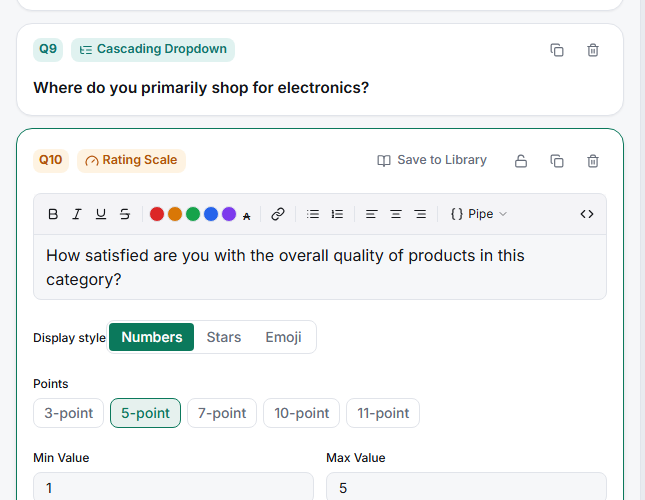
Choose a display style — numeric buttons, stars, or emoji faces, depending on the tone.
Preview it — the Live preview shows the exact control respondents will tap; check it on Phone too.
Key options
| Style | Best for |
|---|---|
| Numeric | Neutral, analytical scales; agreement and likelihood |
| Stars | Quality and satisfaction ratings people already associate with stars |
| Emoji | Consumer audiences, casual tone, quick emotional reactions |
Tips
Tip: Match the style to the construct. Emoji faces are great for "how did this feel?" but wrong for "how likely are you to renew?" — that's a numeric judgment.
Note: Whatever style you pick, keep it consistent across the survey. Switching between stars and numbers mid-survey makes respondents recalibrate every time and adds noise.
Related articles
- Adding Low Mid and High Anchor Labels to a Likert Scale — labeling the scale
- Setting Per-Point Labels on a 5-Point Likert Scale — per-point wording