Question Types
Adding a File Upload Question to Collect Attachments
Let respondents attach files — receipts, screenshots, documents — with a file upload question.
Overview
Let respondents attach files — receipts, screenshots, documents — with a file upload question. Ideal for proof-of-purchase studies, bug reports, and anything where evidence beats description.
Prerequisites
- File Upload is available on the Professional plan and above; uploaded files count toward your plan's storage.
Step-by-step
Add the question — click + Question and choose File Upload.
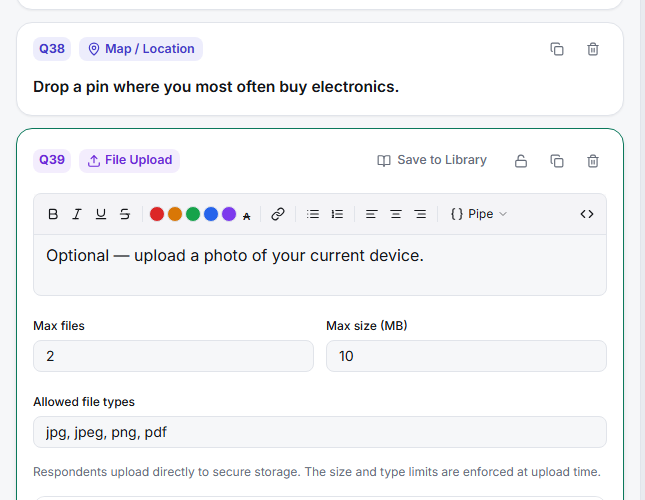
Explain what you want — the question text should name the file ("Upload a photo of your receipt") so respondents know exactly what to attach.
Set the requirement — make it required only when the file is essential; a hard requirement on mobile uploads raises dropout.
Retrieve files from results — uploaded files are attached to each response and available from the results and export views.
Tips
Tip: Tell respondents on the welcome or question screen which formats and rough size you expect — someone trying to upload a 200 MB video into a "screenshot" question just abandons.
Note: Uploads consume storage on your plan (see Settings → Billing). For a high-volume file study, confirm you have headroom or add a storage pack before fielding.
Related articles
- Collecting Webcam Video Responses from Survey Participants — capture video instead of files
- Setting Up a Contact Form to Collect Name Email and Address — structured data capture