Logic & Flow
Using Contains and Not Contains Operators on Multi-Select Answers
Build logic against multi-select questions with Contains and Not Contains — matching whether a specific option was picked.
Overview
Build logic against multi-select questions with Contains and Not Contains — matching whether a specific option was among the answers, regardless of what else the respondent picked.
Why Contains, not Equals
A multi-select answer is a set of options. Equals would require the respondent's selection to match exactly, which is almost never what you want. Contains checks whether one option is in their selection — "did they pick Smartphones, among other things?".
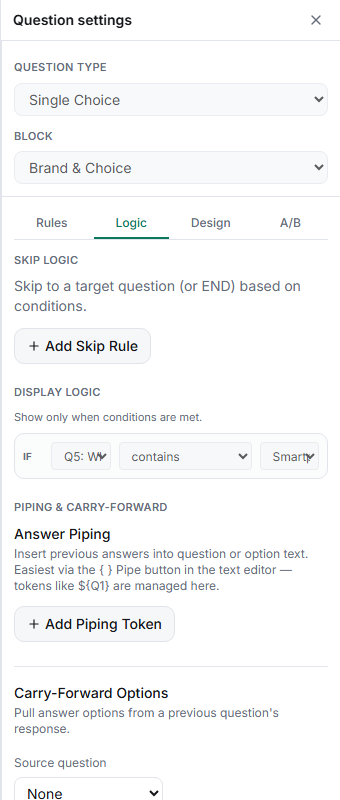
Step-by-step
Add a condition — in a question's Logic tab, add a display-logic condition (or a skip rule) referencing the multi-select question.
Choose Contains or Not Contains — from the operator dropdown, pick Contains to match respondents who selected an option, or Not Contains for those who didn't.
Set the value — the specific option to check for.
Key operators for logic
| Operator | Meaning |
|---|---|
| Contains / Not Contains | An option is / isn't in a multi-select answer |
| Equals / Does not equal | Exact match — best for single choice |
| Is any of / Is none of | Match against a list of values |
| Greater / less than, at least, at most | Numeric comparisons for scales and sliders |
| Is empty / Is not empty | Whether the question was answered |
Tips
Tip: For "picked any of these three", use Is any of with a comma-separated list instead of three OR'd Contains conditions — it's shorter and easier to read.
Note: Use Contains/Not Contains for multi-select and Equals for single choice. Equals on a multi-select rarely matches, because it demands the exact same set.
Related articles
- Using AND vs OR to Combine Multiple Logic Conditions — combining operators
- Showing a Question Only When a Prior Answer Matches a Condition — where operators live