Logic & Flow
Using Carry-Forward to Pull Selected Options into a Later Question
Populate a later question's options from what a respondent selected earlier, so they only see the items they picked.
Overview
Populate a later question's options from what a respondent selected earlier, so they only see the items they picked (or the ones they didn't). It's the difference between "which of your 3 brands is your favorite?" and making them scroll past 20 irrelevant ones.
Step-by-step
Open the later question's Logic tab — select it, click Settings, switch to Logic, and find Carry-Forward Options.
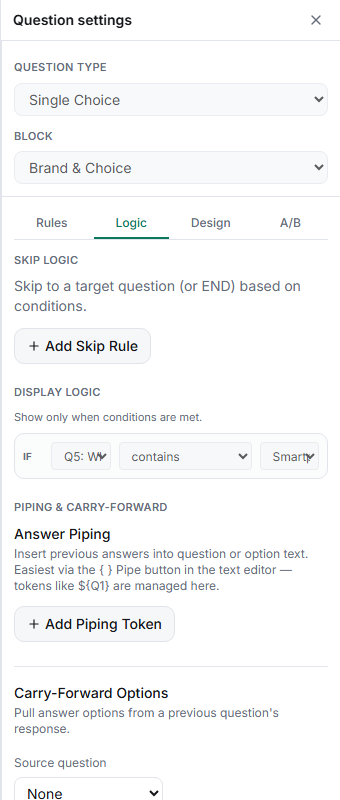
Set the Source question — choose the earlier multi-select question whose answers should become this question's options.
Choose which options carry — the ones the respondent selected, the ones they didn't select, or all of them.
Test the chain — in the Test tab, pick a few options in the source question and confirm exactly those appear in the carry-forward question.
Key options
| Carry mode | Brings forward |
|---|---|
| Selected options | Only what the respondent chose |
| Unselected options | Only what they left out |
| All options | Every option from the source |
Tips
Tip: Carry-forward and dynamic grid rows are the same idea in different shapes — carry-forward feeds a question's options, dynamic rows feed a grid's rows. Reach for whichever matches the question type.
Note: If the source question is skipped or nothing is selected, the carry-forward question can end up empty. Make the source Required, or gate the later question with display logic.
Related articles
- Inserting a Prior Answer into Question Text Using Piping Tokens — pipe text instead of options
- Using Dynamic Rows to Pull Prior Answers into a Grid — the grid equivalent