Logic & Flow
Using AND vs OR to Combine Multiple Logic Conditions
Control whether every condition must be true (AND) or just one (OR) when you combine conditions in a logic rule.
Overview
Control whether every condition must be true (AND) or just one (OR) when you combine conditions in a logic rule. The conjunction is the difference between "narrow" and "broad" targeting.
Step-by-step
Open a rule with two or more conditions — in a question's Logic tab, under Display Logic (or a skip rule's condition group).
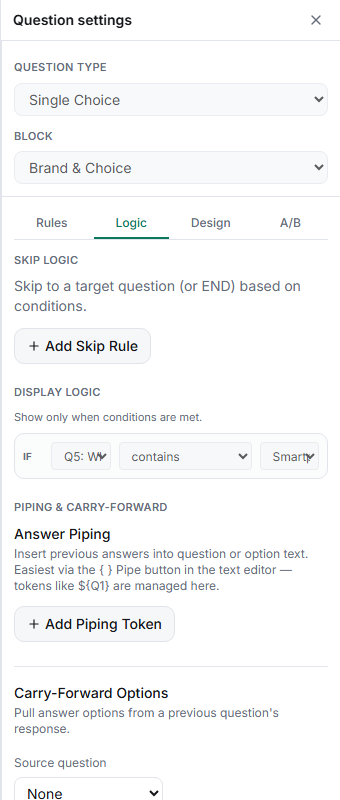
Set the conjunction — toggle the group between AND and OR.
Read it back — AND narrows the audience with each condition; OR widens it.
Key options
| Conjunction | Fires when |
|---|---|
| AND | all conditions are true (narrower) |
| OR | any condition is true (broader) |
Tips
Tip: A quick sanity check: adding a condition under AND can only shrink who matches; adding one under OR can only grow it. If the count moves the wrong way, you've got the wrong conjunction.
Note: All conditions in one group share a single conjunction — you can't mix AND and OR within the same group. For "(A and B) or C", split the logic across separate rules or paths.
Related articles
- Hiding a Question Based on Multiple Combined Conditions — AND/OR on display logic
- Using Contains and Not Contains Operators on Multi-Select Answers — the operators you combine