Logic & Flow
Showing a Question Only When a Prior Answer Matches a Condition
Use display logic to reveal a question only when an earlier answer meets a condition you set.
Overview
Use display logic to reveal a question only when an earlier answer meets a condition you set. The question stays hidden — in place — until the condition is true.
Step-by-step
Select the conditional question — click its card, open Settings, switch to the Logic tab.
Add a condition under Display Logic — "Show only when conditions are met". Choose the source question, an operator, and a value.
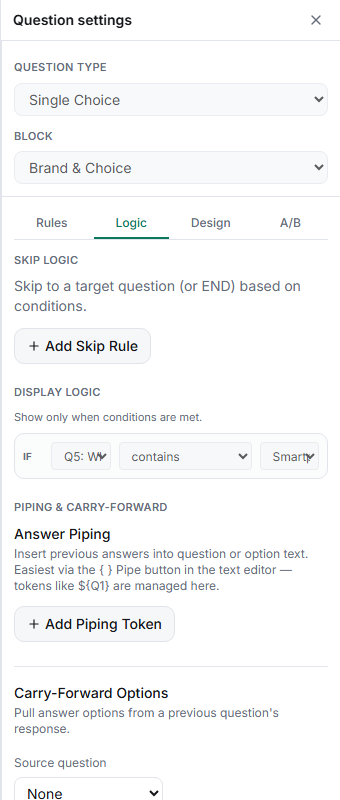
Read the sentence it builds — the condition reads like "IF Q5 contains Smartphones", so you can sanity-check it at a glance.
Test both paths — in the Test tab, answer the source question both ways and confirm the question appears exactly when it should.
Tips
Tip: Display logic is the right tool for optional detail — a follow-up that only some respondents need. It keeps the survey short for everyone else without breaking the question order.
Note: Until you add a condition, the panel says "No conditions set. This question will always display." A question with an empty display-logic block is not hidden — it just always shows.
Related articles
- Hiding a Question Based on Multiple Combined Conditions — more than one condition
- Display Logic vs Skip Logic: When to Use Each — which to choose
- Using Contains and Not Contains Operators on Multi-Select Answers — operators explained